Property details, location and what's nearby
- All plans
- Computer or phone
- Updated
In Vistura, you fill in the listing facts in the editor's Property tab, next to Photos: deal, price, type, rooms, area and address. Buyers open the facts from the info button in the tour, with the area on a map. Add Weather and What's nearby to show them on screen as well. It works on every plan, on a phone or a computer.
Steps
Fill in the essentials
- Open the tour. On a phone, tap the panel button at the top left to open the photo list.
- Select the Property tab.
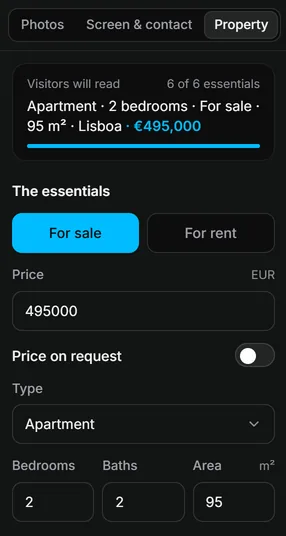
- Under The essentials, choose For sale or For rent.
- Type the Price, or switch on Price on request.
- Choose the Type, then type the bedrooms, bathrooms and area.
The box at the top, Visitors will read, shows the line buyers will see. Everything saves as you type.
Add the address
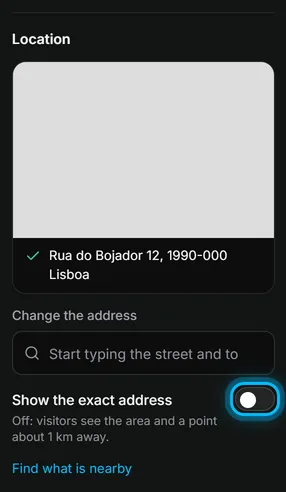
- Under Location, start typing the street and town in Property address.
- Pick the right address in the list. A map shows the spot.
- Leave Show the exact address off to show buyers only the area, with the point moved up to about 1 km from the home. Switch it on to show the street and number.
Vistura looks up what's nearby as soon as you pick the address: shops, schools, transport, parks and more, with walking times.
Show it to buyers
- Select Add (the + at the top right on a phone).
- Under On the visitor’s screen, choose Property details, Weather or What's nearby.
Result buyers see the price and key facts over the tour, and open the full details with a tap. With the address set, they can check the forecast and the places around the home.
Was this helpful?
Thanks for telling us.
Sorry it did not help. Write to us and we will answer: support@vistura.app
More in this section: Build the tour
- Add, replace and download photos
- Organise rooms and floors
- Name the tour and choose its cover
- Link the rooms so buyers can walk through
- Property details, location and what's nearby
- Add notes, photos and buttons inside a room
- Add or change a contact form
- Add a floor plan to your tour
- Add a video (drone or walk-through)
- Narrate the rooms and run a guided tour