Link the rooms so buyers can walk through
- All plans
- Computer or phone
- Updated
In Vistura, a link is the mark buyers tap to walk from one room to the next. Other apps call it a hotspot; in Vistura's preferences it shows as Navigation points. On a computer, drag a photo from the list onto the view. On a phone, use Add > Point on the photo. It works on every plan.
Before you start
Upload the photos and give them clear names: a link takes the name of the room it leads to. See Organise rooms and floors.
Steps
On a computer: drag a photo onto the view
- In the photo list, select the photo of the room where the walk starts.
- Turn the view until you see the door to the next room.
- Drag the next room's photo from the list onto the view, over that door. A link appears on the door, and a message confirms it.
On a phone: add a point
- Tap the panel button at the top left to open the photo list.
- Tap the photo of the room where the walk starts.
- Close its settings with the X, so you see the whole photo.
- Turn the photo until you see the door to the next room.
- Tap Add (the + at the top right), then Point on the photo.
- Tap the photo where the door is, at floor level. A point appears there.
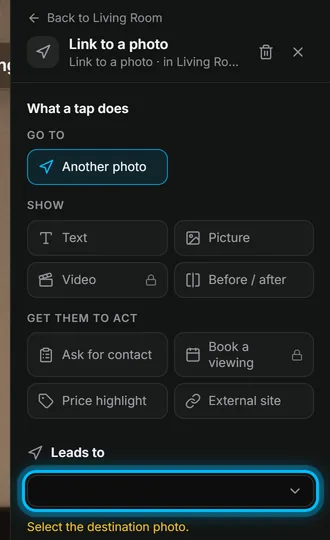
- Tap the point to open its settings.
- Under What a tap does, keep Another photo chosen.
- Under Leads to, pick the next room's photo.
Link every room both ways
- Open the next room and link it back to the room you came from.
- Do the same for every room, until each photo leads somewhere.
- Select Preview at the top and walk through the home as a buyer would.
Result buyers walk through the home with a tap on each link, and back again.
Was this helpful?
Thanks for telling us.
Sorry it did not help. Write to us and we will answer: support@vistura.app
More in this section: Build the tour
- Add, replace and download photos
- Organise rooms and floors
- Name the tour and choose its cover
- Link the rooms so buyers can walk through
- Property details, location and what's nearby
- Add notes, photos and buttons inside a room
- Add or change a contact form
- Add a floor plan to your tour
- Add a video (drone or walk-through)
- Narrate the rooms and run a guided tour