Bring buyers from property portals to your tour
- All plans
- Computer or phone
- Updated
Vistura gives you two ways to take buyers from your portal listings to your tour: a link for each portal, in Share > Link for portals, and your listing photos stamped with the tour's QR code and link. Both work on every plan, on your phone or a computer. Seeing which portal brings the visits needs Pro or Business.
Before you start
The tour needs a link: in Share, under Who can see it, choose Public.
Steps
Copy the link for a portal
- In the tour editor, select Share at the top right. On a phone, it is the share icon.
- Near the bottom of the Share dialog, open Link for portals.
- Pick the portal where the home is listed, such as Idealista or Rightmove: the list follows the home's country. If the portal is not there, pick Other portal and type its name.
- Choose what the tour shows: leave the box under the portals ticked to open the tour without your contact details, forms and logo, or untick it to keep them.
- Select Copy, then paste the link in your listing on that portal.
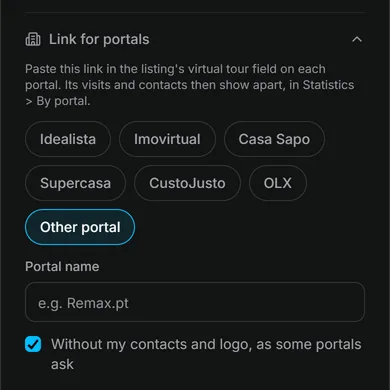
Do the same for each portal you use: each one gets its own link.
Result buyers open your tour from the listing. With the box ticked, they still walk through every room and see the floor plan and room details.
Put the QR code and link on your listing photos
- On your dashboard, select Tour options (the … on the tour's card), then Images for social media.
- Open the tab QR stamp on photos. The stamp works on every plan.
- Select Add photos and pick your listing photos, or select Use views from the tour.
- Choose the Corner.
- Under Size and look, choose the size, and Light or Dark.
- Under Text on the stamp, change the text buyers read.
- Select the download button below the photos (Download photo when there is one photo).
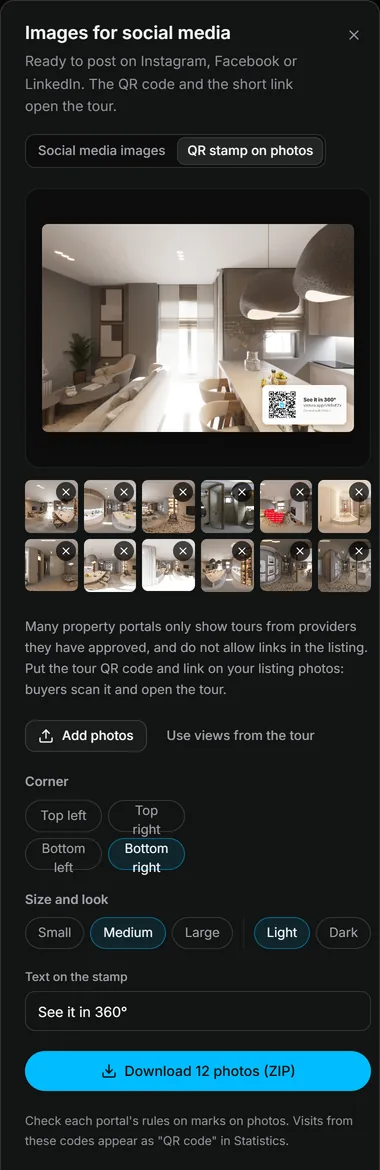
One photo downloads as a JPEG; several come together in a ZIP file. On a phone, you can also stamp and download the photos one at a time.
Result each photo has a small card in the corner with the tour's QR code and link. Upload these photos to your listing. Buyers scan the code with their phone camera and the tour opens.
See which portal brings the buyers
In Statistics, By portal shows the visits from each portal link and the leads they brought. Visits from the stamped photos show as QR code. Where visits come from needs Pro or Business on your account.
Was this helpful?
Thanks for telling us.
Sorry it did not help. Write to us and we will answer: support@vistura.app
More in this section: Publish and share
- Publish a tour and choose who can see it
- Send the tour: link, QR code, WhatsApp
- Put the tour on your website
- Make images for social media from your tour
- Bring buyers from property portals to your tour
- Your tour's address: short link, custom address, own domain
- Your public profile page
- Protect the owner's privacy
- Mark a property as sold
- Take a tour offline, or choose which tours stay online
- Delete a tour