Mark a property as sold
- All plans
- Computer or phone
- Updated
When a home sells, open the tour's menu on your Vistura dashboard and choose Mark as sold. The link keeps working: buyers who open it see that the home sold. If your profile is public, they also see your other homes for sale; if the tour has a contact form, they can leave their contact. It works on every plan, on your phone or a computer.
Steps
- On your dashboard, find the tour under Your tours.
- Select Tour options (the … on the tour's card).
- Select Mark as sold.
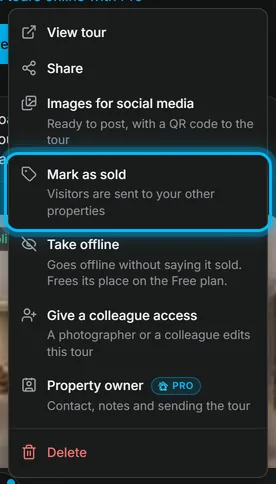
Result the tour moves to the Sold section at the bottom of your tours. Everything stays saved: photos, leads and statistics.
What buyers see when they open the link
The link on a portal, a flyer or a QR code in the shop window now opens this page:
- This home has been sold, with a Sold stamp at the top.
- When your profile is public: up to 6 of your homes still for sale, each with Open the tour, and a button to all your homes.
- When the tour has a contact form: Looking for something similar?, a short form for a name and a phone or email. What they send arrives in Leads.
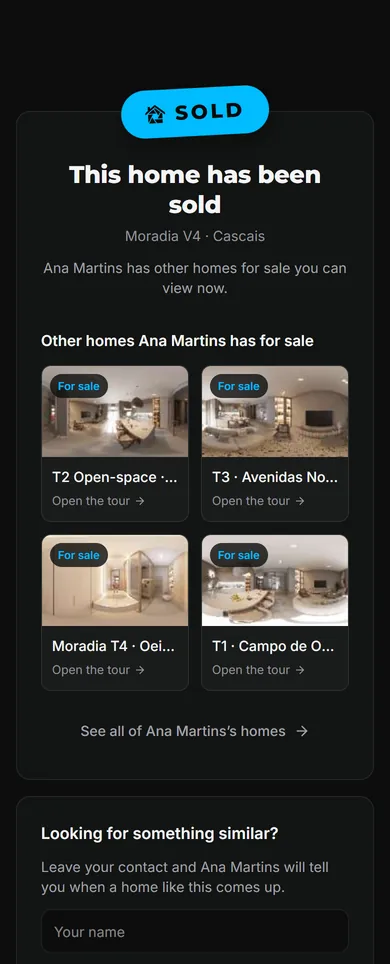
You and your team still open the tour itself, signed in.
The tour also leaves search results, and your public profile shows it under Recently sold. In Statistics, the visits it sends to your other homes show as A sold home's page.
Put it back on sale
- At the bottom of your tours, in the sold section, select Show the sold tours.
- Select Tour options on the tour, then Back on sale.
Was this helpful?
Thanks for telling us.
Sorry it did not help. Write to us and we will answer: support@vistura.app
More in this section: Publish and share
- Publish a tour and choose who can see it
- Send the tour: link, QR code, WhatsApp
- Put the tour on your website
- Make images for social media from your tour
- Bring buyers from property portals to your tour
- Your tour's address: short link, custom address, own domain
- Your public profile page
- Protect the owner's privacy
- Mark a property as sold
- Take a tour offline, or choose which tours stay online
- Delete a tour