Make images for social media from your tour
- All plans
- Computer or phone
- Updated
In Vistura, Images for social media turns a tour into a ready-to-post image with a photo of the home, its details, your name and a QR code that opens the tour. Open it from the tour's menu on your dashboard, or from Share in the editor. It works on every plan, in 4 sizes. A choice of 3 designs, light or dark, in your colours needs Pro or Business.
Before you start
Make the tour Public first, so the QR code opens it for everyone: see Publish a tour and choose who can see it.
Steps
- On your dashboard, select Tour options (the … on the tour's card), then Images for social media.
- Under Size, choose the size. The sizes are listed below the steps.
- On Pro or Business, under Design, choose Classic, Full photo or Frame, and Light or Dark.
- Under Photo, pick the tour's cover, a room, or Your photo from your device.
- For a 360 photo, move Direction of the view until the room looks its best.
- Check the Title, and type the Details: bedrooms, area, price.
- Leave your name on the image, or turn it off with the switch that shows your name. On Pro, the switch also removes your logo.
- Select Download PNG. Where your device can share files, Share sends the image straight to Instagram, WhatsApp or another app.
- Select Copy caption and paste it under your post. It holds the title, the details and the tour's link.
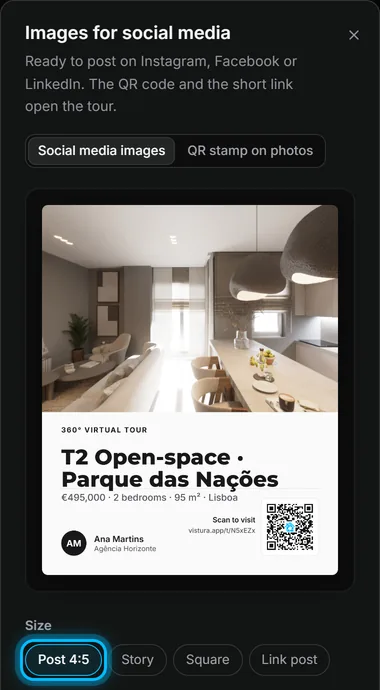
Result a PNG image, sized for the place you post it, whose QR code opens the tour.
The 4 sizes
| Size | Use it for |
|---|---|
| Post 4:5 | Instagram and Facebook feed posts |
| Story | Stories; the text stays clear of the app's own buttons |
| Square | Any feed |
| Link post | A wide image for a post that shares the tour's link, on Facebook or LinkedIn |
Was this helpful?
Thanks for telling us.
Sorry it did not help. Write to us and we will answer: support@vistura.app
More in this section: Publish and share
- Publish a tour and choose who can see it
- Send the tour: link, QR code, WhatsApp
- Put the tour on your website
- Make images for social media from your tour
- Bring buyers from property portals to your tour
- Your tour's address: short link, custom address, own domain
- Your public profile page
- Protect the owner's privacy
- Mark a property as sold
- Take a tour offline, or choose which tours stay online
- Delete a tour