Your public profile page
- All plans
- Computer or phone
- Updated
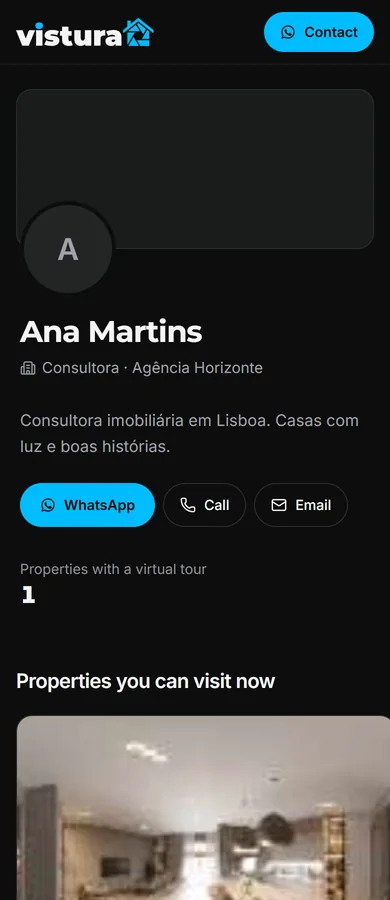
Your public profile is your own page on Vistura, at vistura.app/@yourname: your photo, a few lines about you, one-tap contact buttons and every public tour, with sold homes shown separately. You set it up in Settings > Profile, on your phone or a computer. It works on every plan.
Steps
- On your dashboard, select Settings, then Profile, then Edit profile.
- Choose your Username. Your link shows under it as vistura.app/@ and the name you chose.
- Check that Public profile is on, and select Save changes.
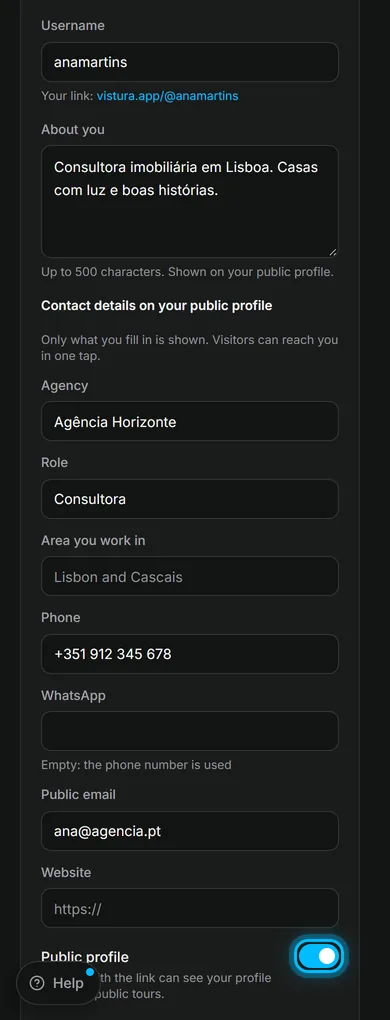
For your photo, a few lines about you, your agency, role, area and contact details, see Sign in and set up your profile. Only what you fill in is shown.
Result your link shows under your name. Select it to see the page as buyers see it.
What buyers see on your page
- Your name, role, agency and area, with buttons for WhatsApp, Call, Email and Website.
- Properties you can visit now: every tour that is public and online.
- Recently sold: the homes you marked as sold, as a record of your work.
- On Pro and Business, your own logo and main colour.
Where your profile works for you
- When a home sells or goes offline, buyers who open its old link see your other homes and a button to your profile.
- In each tour, the property details show Created by with a link to your page.
- Put the link in your email signature, on your social media and on your business card.
Was this helpful?
Thanks for telling us.
Sorry it did not help. Write to us and we will answer: support@vistura.app
More in this section: Publish and share
- Publish a tour and choose who can see it
- Send the tour: link, QR code, WhatsApp
- Put the tour on your website
- Make images for social media from your tour
- Bring buyers from property portals to your tour
- Your tour's address: short link, custom address, own domain
- Your public profile page
- Protect the owner's privacy
- Mark a property as sold
- Take a tour offline, or choose which tours stay online
- Delete a tour