See who visited your tour
- All plans
- Computer or phone
- Updated
Vistura counts the visits to your tours in Statistics on your dashboard: how many people came, day by day and tour by tour. Visitors stay anonymous until they leave their details; then they are a lead in Leads. Where visits come from, how long people stay and which rooms they look at need Pro or Business.
Steps
- On your dashboard, select Statistics.
- At the top, choose a tour, or keep All tours.
- Choose the period next to it.
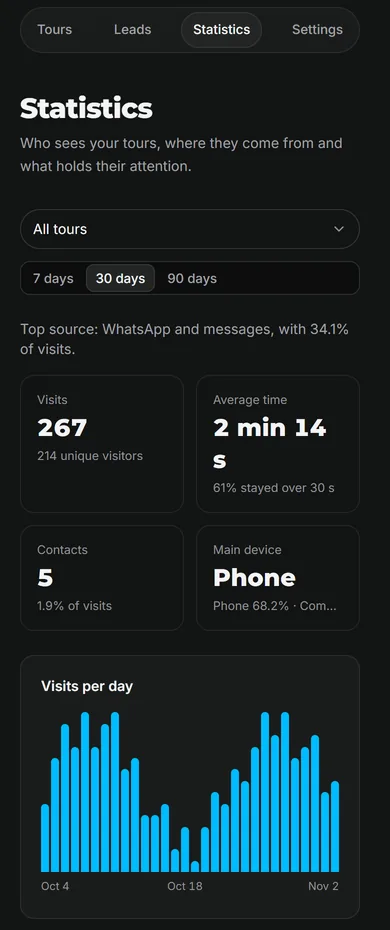
Result you see Visits with the number of unique visitors, Contacts (the people who left their details, the same people you find in Leads) and Visits per day.
What each plan shows
| What you see | Free | Pro and Business |
|---|---|---|
| Visits, unique visitors, Contacts | Yes | Yes |
| Visits per day, for each tour | Yes | Yes |
| Where visitors come from | No | Yes |
| Average time, Main device | No | Yes |
| Rooms that hold attention, Favourite rooms | No | Yes |
| From visit to contact | No | Yes |
Vistura saves your visits from the first one on every plan, so when you move to Pro the detail is there for the period you choose.
Read the full statistics
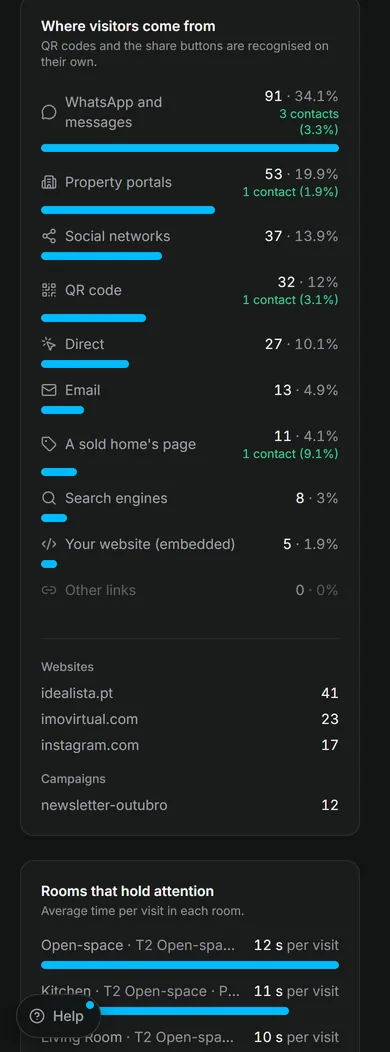
- Where visitors come from: how each visit found the tour, such as QR code, WhatsApp and messages, Property portals or Your website (embedded), with the leads each source brought. QR codes and the share buttons are recognised on their own.
- Rooms that hold attention: the average time per visit in each room. Show these rooms first at a viewing.
- From visit to contact: 3 steps, Visits, Explored (30 s+) and Contacts, so you see how many visitors explored and how many got in touch.
- Direct contact: taps on WhatsApp, call or email buttons. These people contact you without a form.
- Favourite rooms: the rooms visitors marked with the heart.
- By tour: each tour's visits, time and leads. Select a tour's number of leads to see them.
Who are the visitors?
Vistura counts visits without cookies and does not identify visitors. You learn who someone is when they send a form or book a viewing from the tour. Open that lead to see the visit it came from: see See what a buyer looked at before you call.
Was this helpful?
Thanks for telling us.
Sorry it did not help. Write to us and we will answer: support@vistura.app