Get an alert the moment a lead arrives
- Plan: Pro
- Computer or phone
- Updated
Vistura sends a notification to your phone or computer within seconds of a new lead, so you answer while the buyer is still looking at the tour. Turn it on in Leads, once on each device. Lead alerts need Pro or Business on your account.
Before you start
On an iPhone, add Vistura to your Home Screen first: in Safari, tap Share, then "Add to Home Screen", and open Vistura from the new icon.
Steps
- On the phone or computer that should ring, open your dashboard and select Leads.
- In the card Get an alert when a lead arrives, select Turn on alerts on this device.
- When the browser asks whether Vistura may show notifications, choose Allow.
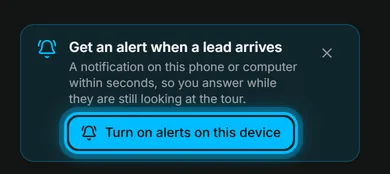
Result the card becomes one line, Lead alerts are on for this device. Each new lead now shows on this device with the buyer's name and the tour. Tap the alert to open the lead.
Repeat the steps on each phone or computer where you want the alert. A viewing booked from the tour sends an alert too, with the day and time.
Was this helpful?
Thanks for telling us.
Sorry it did not help. Write to us and we will answer: support@vistura.app