See what a buyer looked at before you call
- Plan: Pro
- Computer or phone
- Updated
In Vistura, each lead shows the visit it came from: open the lead in Leads and read Before getting in touch. You see where the buyer found the tour, how long they stayed, the rooms they spent time in and the ones they liked. Before getting in touch needs Pro or Business on your account.
Steps
- On your dashboard, select Leads.
- Select the lead's name to open it.
- Scroll to Before getting in touch.
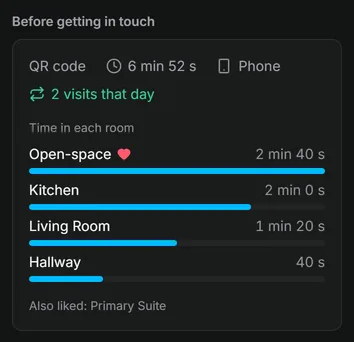
Result you start the call with what matters to that buyer: "I saw you spent time in the kitchen and liked the terrace."
What you see
| What the lead shows | What it tells you |
|---|---|
| Source | How the buyer found the tour: QR code, WhatsApp and messages, Property portals, Social networks and more, with the website when there is one |
| Time in the tour | How long the whole visit lasted |
| Device | Phone, Tablet or Computer |
| Time in each room | The rooms they looked at, longest first |
| Liked rooms | The rooms they marked with the heart. Rooms they liked but barely looked at show under the list |
When the buyer came back to the tour more than once that day, a green line says how many visits they made. When they sent the form from a room, the lead says which room they asked about.
Was this helpful?
Thanks for telling us.
Sorry it did not help. Write to us and we will answer: support@vistura.app