What is a 360 photo, and what does it do for a listing?
What is a 360 photo? The file behind it, how a viewer makes it a room, how it differs from wide angle or a tour, and what one does for a listing.
What is a 360 photo? It is one image of everything around a single point: all the way round, up to the ceiling and down to the floor. On screen, you drag to look in any direction from where the camera stood. In a listing, it shows the whole room instead of the part a wide-angle shot chose.
What is a 360 photo, exactly?
A 360 photo covers 360 degrees across and 180 degrees up and down, which Google's specification writes as "360 degrees x 180 degrees". On screen, you can look at it from any angle: up, down, behind you and to either side.
You will also see it called a 360 degree photo, a spherical photo, a 360 panorama or a photo sphere, which is Google's name.
Two other things share the words. A 360 product spin is a set of shots taken around an object, and a 360 photo booth records short videos at events.
What a 360 photo file really is
Open one in a normal gallery and you see a strange wide picture, not a room. Here is one, from a sample room:
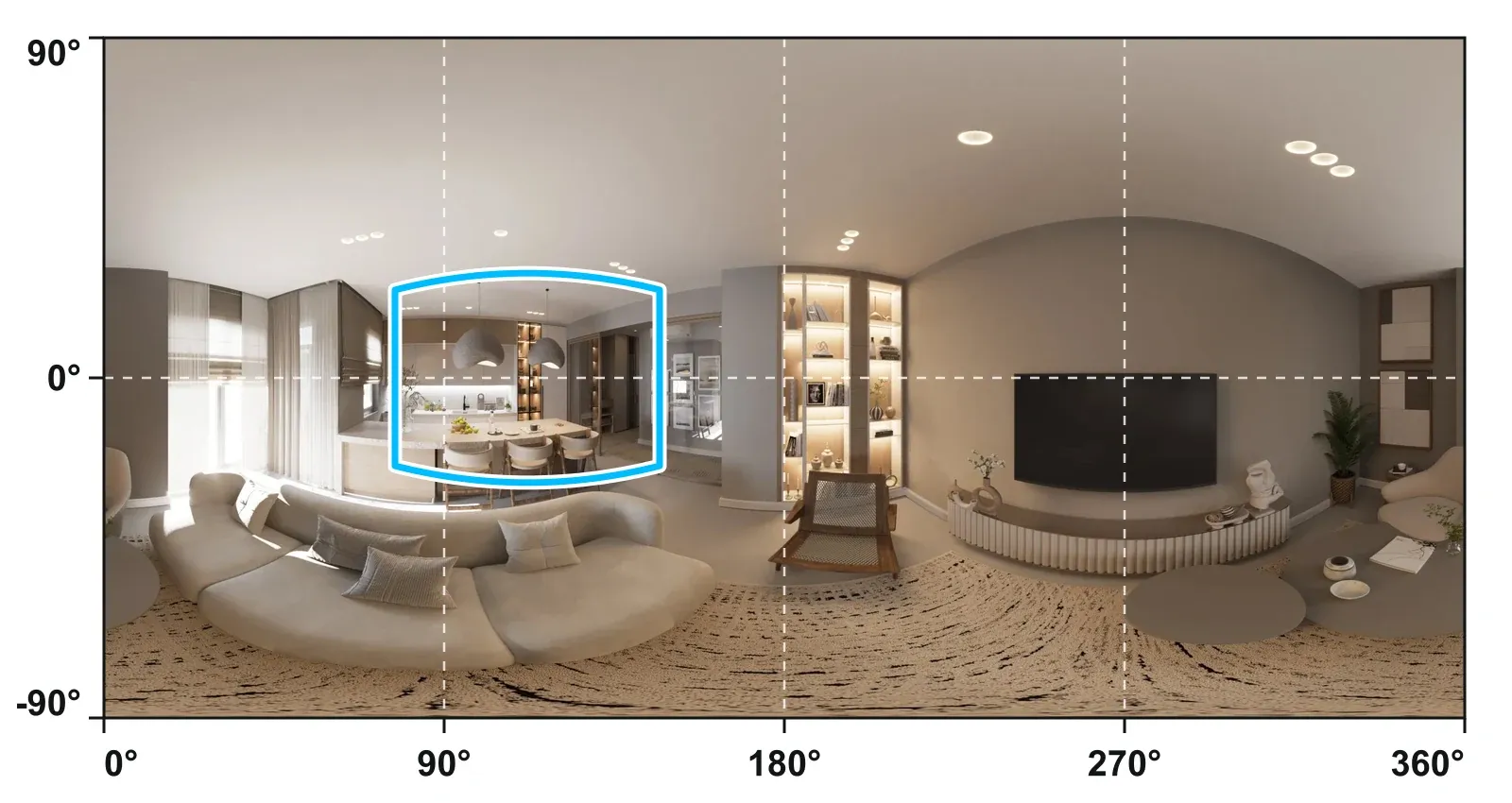
One flat image, twice as wide as it is tall
Think of a world map: a sphere laid flat, in a shape called equirectangular. Google Maps asks for a "2:1 image aspect ratio" for photo spheres.
That shape has three consequences. The sums are simple, and they are ours:
- The left and right edges are the same line in the room.
- The whole top row of pixels is one point, straight up. That is why ceilings look stretched.
- The top and bottom sixths of the image take a third of its pixels and show about 13% of the room.
A few lines of metadata
Inside the file sit a few lines called GPano, which hold "properties that provide information regarding the creation and rendering of photo spheres". One of them is ProjectionType, and "Google products currently support the value equirectangular only".
Google uses these lines to treat the file as a sphere, so check what the service you post to asks for. A messaging app or an editor can remove them, and the edit guide shows how to put that right.
How a viewer turns a flat file into a room
A viewer wraps the image around the inside of a sphere and puts you at the centre. Dragging turns the view. Nothing is rebuilt, so you only ever see the room from that one point. That is why you can look anywhere but cannot walk.
You need no headset. A browser on a phone or computer does the job.
Why a sharp-sounding file can look soft
An 8K file (7,680 x 3,840, about 29.5 MP) spreads its width over 360 degrees, which is about 21 pixels per degree. A view 75 degrees across uses about 1,600 of those pixels. A 12 MP phone photo puts 4,000 pixels across what you see.
So read 360 megapixels as coverage, not sharpness. The Google Maps minimum of "7.5 MP or larger (3,840 x 1,920 px)" gives half that detail. These sums are ours too.
To see where your own file stands, the free test a 360 photo tool checks its shape, resolution, metadata, horizon and seam, and the photo stays on your device.
360 photo, wide angle, virtual tour or 3D model?
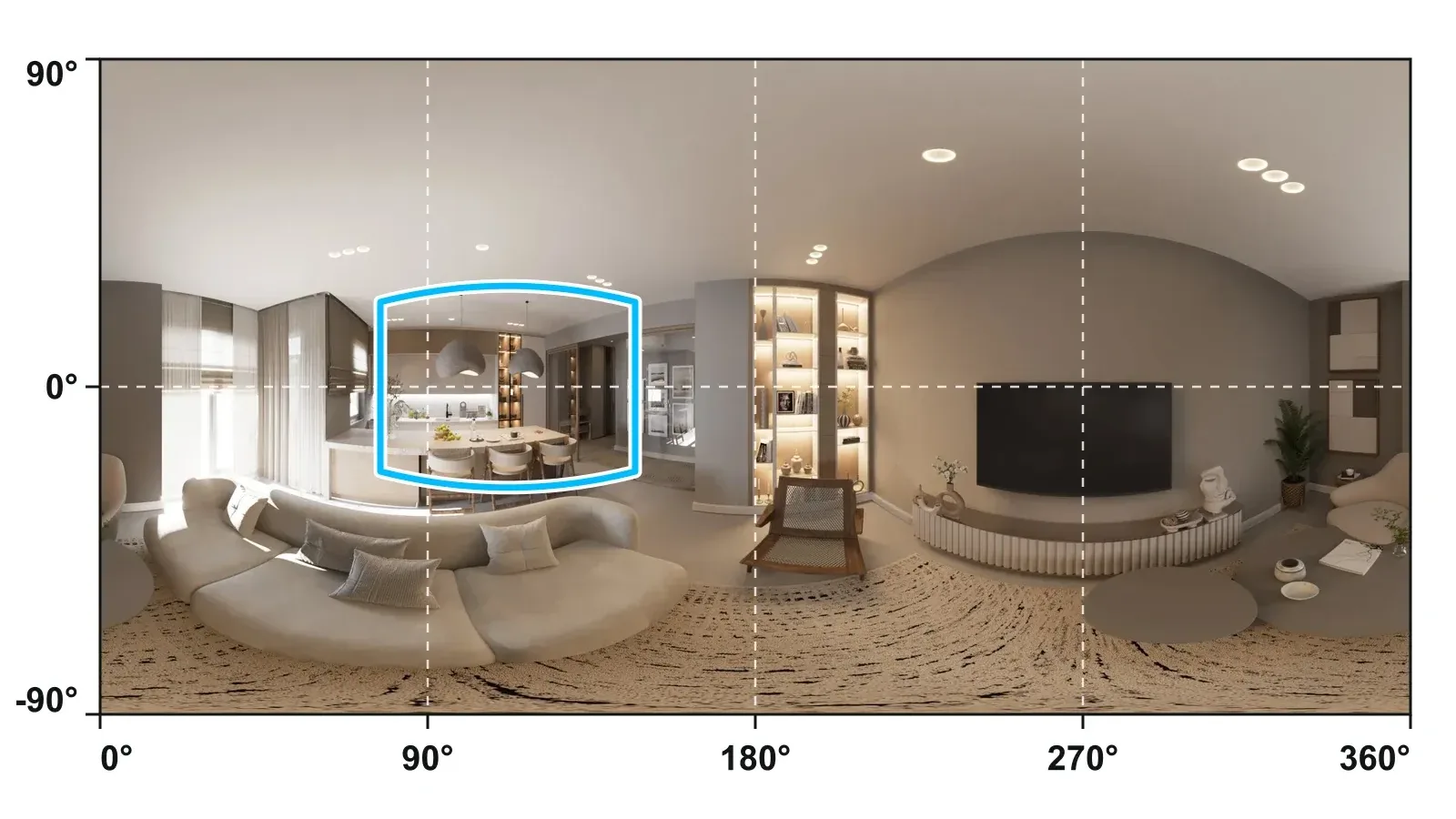
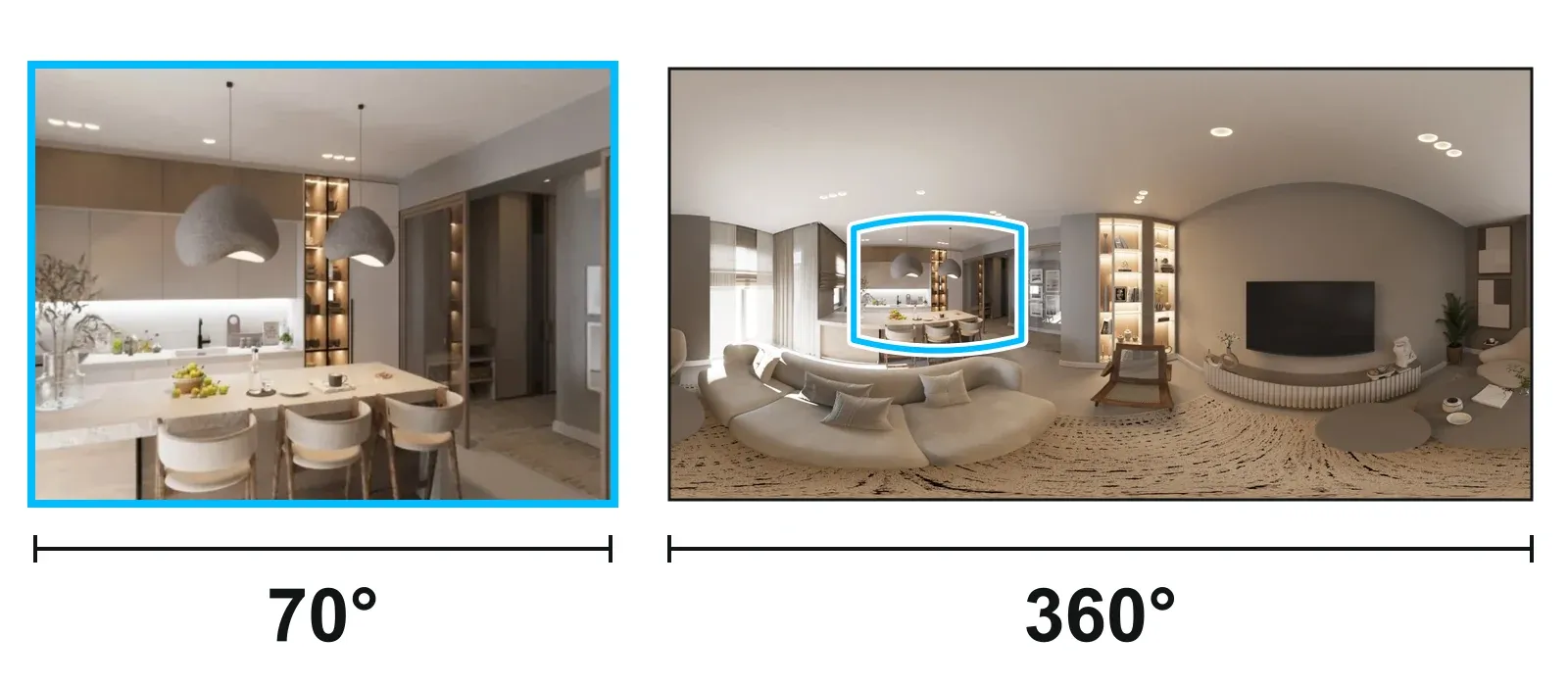
The picture below shows a normal 70 degree view of a sample room on the left, and on the right the whole 360 image with the same area framed in blue.
| Wide-angle photo | 360 photo | Virtual tour | 3D model | |
|---|---|---|---|---|
| What it holds | The part of the room in the frame | Everything round one point | A 360 photo per room, linked | A measured shape of the space, with depth |
| What the viewer does | Looks at it | Turns and looks up and down from one spot | Turns, then moves room to room | Moves through it and sees the whole from outside |
| Made with | Phone or camera | 360 camera, or a phone with an app | A set of 360 photos, joined in an editor | A depth camera or scanner |
The 70 degree view in that picture covers about 9% of the full sphere. An iPhone 17's Ultra Wide lens has a "120° field of view", according to Apple. Taken across the diagonal of a 4:3 frame, that is about 20%, a fifth of the sphere. Both sums are ours. A 360 photo holds the rest too.
The two do different jobs, so use both. A flat shot chooses and flatters, and good listing photos still do that job. A 360 shows the rest, and the buyer checks it for themselves.
A phone's Pano mode gives a wide strip, not a 360, as the iPhone guide explains. For how linked rooms work, see real estate virtual tours.
What a 360 photo does for a listing
One 360 photo answers a simple question: what does the rest of the room look like? That is the job of 360 photos in real estate. We know of no study of a single photo; the research measures tours.
What one photo does
- It shows what the frame left out: the ceiling, the floor, the wall behind the photographer.
- It shows how a space connects, when you take it where a door or opening shows the next room.
- It answers before the viewing, because buyers turn it themselves. The authors of one study below call tours a "more truthful reflection of a property's product quality".
- It gives you normal photos too. The free 360 photo to normal photos tool frames any view and saves it for the listing, "with straight walls instead of curved ones".
What the research says about tours
Two independent studies help you set the right expectations with an owner:
| Where and when | Size | What it found | Keep in mind |
|---|---|---|---|
| China's leading platform, 2018 to 2019 | Nearly 43,000 properties | VR tours shortened average listing time from 34 days to 19; "VR is not increasing the home's value" | Less effect on older homes, more on large ones |
| Greater Los Angeles, March 2019 to March 2021 | 75,178 houses sold through Redfin listings | After controlling for photo and caption quality, the effect of 3D virtual tours on price was "insignificant" | The time on market benefit looked short-term |
So leave a higher price and a set number of days out of your pitch: neither study supports a price gain, and they differ on time. What you can offer an owner is simple: buyers can look round for themselves before they book a viewing. Harvard Business School's report on the Los Angeles study names the gain for an agent: tours can "reduce showings with unlikely buyers".
If you meet bigger numbers, check who measured them. Many come from companies that sell tours.
How a 360 photo reaches a listing
A normal photo gallery shows the file as a flat picture. Portals take a link instead: Rightmove in the UK asks you to "Enter the URL of the Virtual Tour or video". Check what your own MLS or portal accepts. So a 360 reaches a listing as a link to a viewer page, which is what a tour is.
A 360 also shows everything, so check it before it goes online. You can blur faces and documents and remove the GPS position for free. In a Vistura tour, the GPS position goes by itself on upload, with no separate tool.
What to do next with a 360 photo
- Have a 360 file? Open it in the free 360 photo viewer. It runs in your browser with no sign-up, and the photo never leaves your device.
- Check it. Test a 360 photo gives you a clear checklist of what is right and what to fix.
- No file yet? Vistura Capture turns your phone into a 360 camera and joins the photos into one 360 photo. It is free to capture, with nothing to install, and you sign in when you send the rooms to a tour or download them. Or choose a 360 camera.
- Turn the rooms into a tour. In Vistura you link each room's 360 photo into a virtual tour and share it by link, QR code, WhatsApp or embed. When the tour has to win the listing, Pro adds a floor plan, video, narration and a guided tour, your logo and colours with no Vistura badge, viewings booked into your calendar and "Before you call", which shows what each lead looked at, with unlimited tours online. For an agency, Business adds shared tours, leads and agency brand, with 3 people included. Compare the plans.
Frequently asked questions
Do you need a VR headset to view a 360 photo?
No. A browser on a phone or computer is enough, and the free 360 photo viewer on this site opens the file with no sign-up.
What resolution should a 360 photo have?
Google Maps asks for at least 7.5 MP (3,840 x 1,920 pixels), and more resolution gives more detail when you zoom. The free test a 360 photo tool checks your file against a clear checklist.
Can I upload a 360 photo to a property portal?
Usually as a link rather than a file: Rightmove in the UK asks for the URL of the virtual tour. Check what your own portal or MLS accepts before you publish.
Can you turn a 360 photo into a normal photo?
Yes. The free 360 photo to normal photos tool lets you frame any view and save it with straight walls instead of curved ones.