Export your data or delete your account
- All plans
- Computer or phone
- Updated
In Vistura, Settings > Data and account gives you a copy of everything stored about your account, in one file. The same screen deletes the account and its data for good. Both work on every plan, on your phone or a computer.
Steps
Download your data
- On your dashboard, select Settings, then Data and account.
- Under Download your data, select Download my data (JSON).
- Find the file vistura-data with today's date in your downloads.
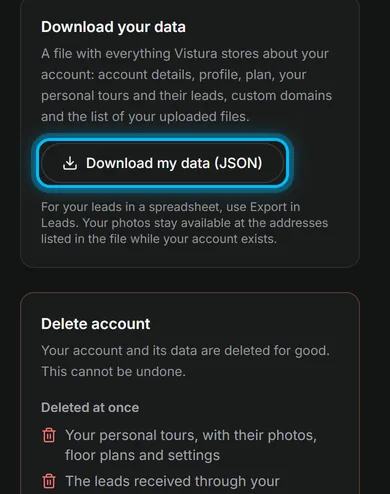
The file holds your account details, profile, plan, your personal tours with all their content, their leads, your custom domains and the addresses of your uploaded photos. It is a JSON file: a developer or another app can read it.
Delete your account
- In Data and account, read the two lists under Delete account: what is deleted at once, and what is kept for a limited time.
- Select Delete my account.
- To keep a copy, select Download my data first.
- Type your account email in the box.
- Select Delete account.
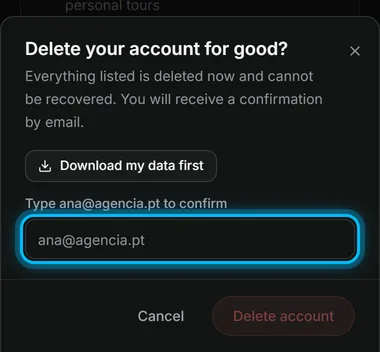
Result you are signed out, and Vistura sends a confirmation to your email.
What is deleted, and what stays
Deleted at once:
- Your personal tours, with their photos, floor plans and settings
- The leads received through your personal tours
- Your public profile, logo and branding
- Your custom domains
- Your sign-in account
Kept for a limited time:
- Invoices: Stripe keeps them for the period tax law requires
- Backups: deleted automatically within 30 days
A paid plan is cancelled at the same moment, without a refund for the current period. Links to your tours stop working.
Was this helpful?
Thanks for telling us.
Sorry it did not help. Write to us and we will answer: support@vistura.app