Contact Vistura support
- All plans
- Computer or phone
- Updated
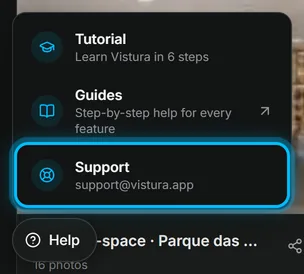
To contact Vistura support, write to support@vistura.app. In the app, select Help at the bottom left of your dashboard, then Support: your email app opens with the address and the subject filled in. Support helps with the app, your plan and payments, and your account.
Before you start
Look for the message Vistura showed you in Something isn't working: most problems have a fix you can do yourself.
Steps
- On your dashboard, select Help at the bottom left.
- Select Support. A new email opens, to support@vistura.app, with the subject Help with Vistura.
- Write what you need, with the details below, and send it.
Result your email reaches Vistura support, and the answer comes back to the address you wrote from.
What to send
- The tour's link, from the Share dialog: see Send the tour: link, QR code, WhatsApp.
- What you did, step by step, and what you expected to happen.
- The message Vistura showed, word for word.
- A screenshot of the screen, and whether you were on a phone or a computer.
- The email address of your Vistura account, if you write from another one.
Was this helpful?
Thanks for telling us.
Sorry it did not help. Write to us and we will answer: support@vistura.app