Real estate CRM: what it must do and how to choose one
What a real estate CRM must do for an agent, what free and paid ones cost, and how to choose one by where your clients come from, with a 30-minute test.
A real estate CRM is the one place where every enquiry, client and next step lives, so no lead waits for an answer and no past client is forgotten. This guide shows what it must do, what each kind costs, and how to choose one by where your clients actually come from. It ends with a 30-minute test you can run on any free trial before you pay.
What a real estate CRM does for an agent
A CRM (customer relationship management system) for real estate keeps one record per person, with the homes they asked about, the stage they are at and the date you contact them next. Its job is simple: make sure nobody who raised a hand is left waiting.
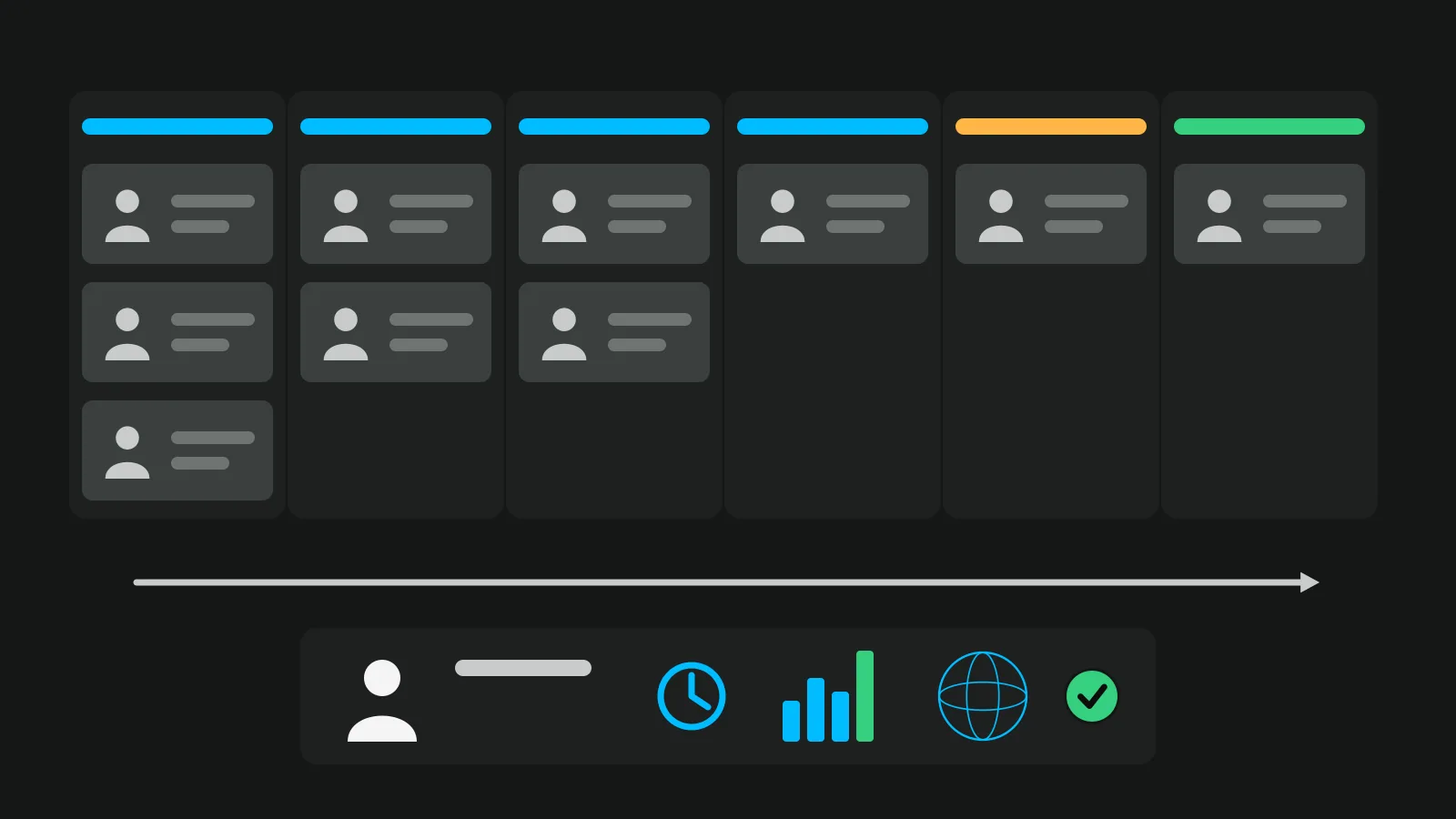
In practice it does six jobs:
- Catches every enquiry in one place, whatever the source: portal email, website form, call, WhatsApp, tour.
- Keeps one record per person, with every listing they asked about.
- Shows the stage each lead is at.
- Gives every open lead a next contact date, and shows today's list.
- Lets you reply from your phone in one tap.
- Tells you how fast you answer and where your deals come from.
Anything that does these six is a CRM, whatever the vendor calls it. Good real estate lead management is mostly jobs 3 and 4 done every day; the rest makes them faster.
What a lead should carry before the first call
The best way to judge a CRM is to open one lead and ask: do I know enough to call this person now? These are the fields that make the call easy.
| Field | Why it matters on the call | Where it comes from |
|---|---|---|
| The listing they asked about | You open with the home, not "are you still interested?" | Portal email, form, tour |
| Their message, word for word | Their question is your first sentence | Same |
| Source (portal, sign, QR, referral, social, tour) | A referral already trusts you; a sign call has seen the street | Form field, tracking, or you ask |
| What they looked at | You know the room they care about | Only tours and some websites record it |
| Consent to marketing (yes or no) | Whether you may send them other homes later | The form's opt-in box |
| Stage | So nobody calls them twice, or never | You, or the tool when you reply |
| Next contact date | The rule that holds the CRM together | You |
| Who owns the lead (in a team) | One person answers | Assignment |
Most CRMs fill the first two rows from a portal's email. The source and what they looked at are the rows most leads arrive without, and they are the ones that change how the call starts. For how to use them on the phone without sounding like you were watching, see our guide to real estate lead follow up.
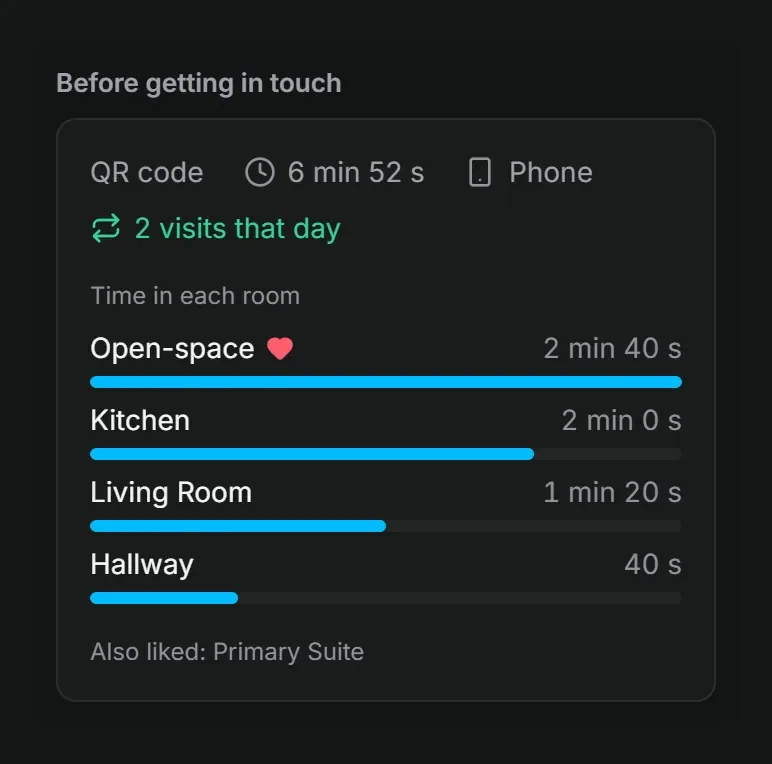
A lead from a Vistura tour arrives with the first rows already filled, on any plan: the listing, their message, and whether they ticked the optional box to receive news about other properties. On Pro, the "Before getting in touch" panel adds the two rows most leads lack: where the person came from (a QR code, WhatsApp, a social network, a property portal, email, a search engine or your website) and what they looked at, with the time in each room, the rooms they liked and the room they asked about, shown as "Asked about: Kitchen". The WhatsApp, Call and Email buttons under Answer reply in one tap, on every plan.
Stages and dates: the part that stops leads going cold
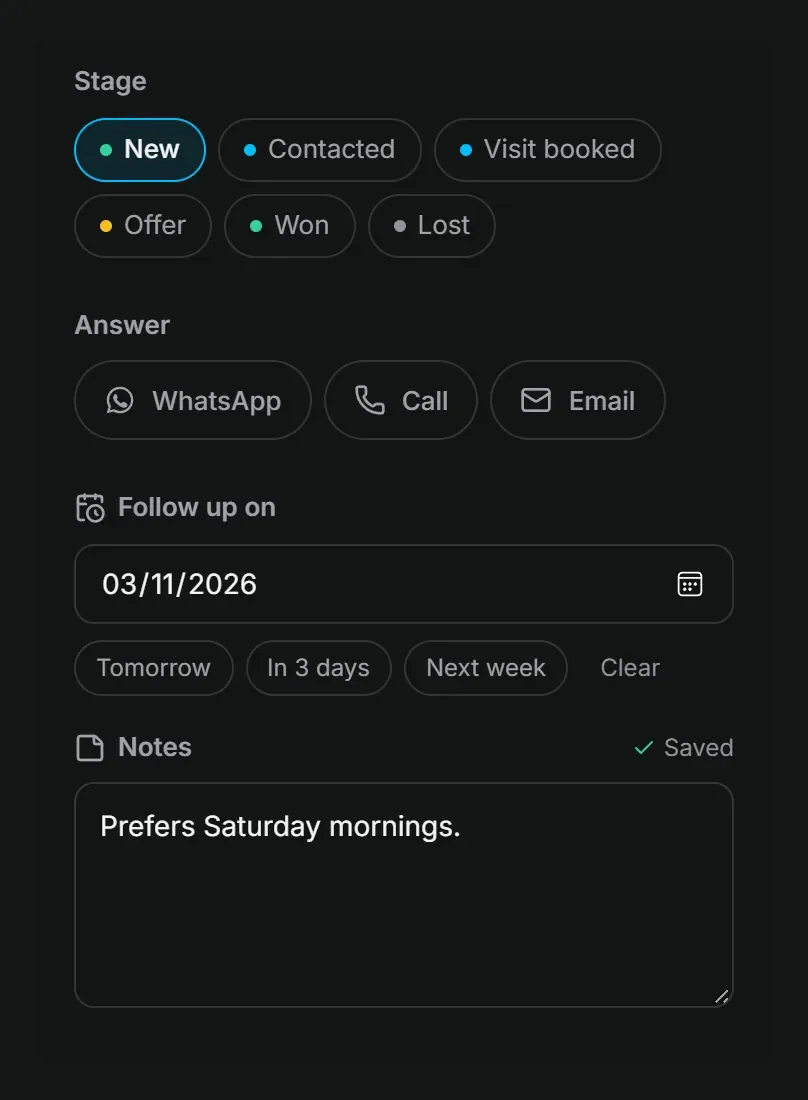
Six stages cover almost every sale: new, contacted, viewing booked, offer, won, lost. You do not need more. What you need is one rule: every open lead has a next contact date. A lead with no date is a lead nobody will call.
Then watch one number each week: the median time from enquiry to your first reply. If it grows, the CRM is not the problem; the habit is.
The full table, with when to move each lead from one stage to the next, is in our guide to real estate lead follow up. The test for any CRM here is short: can it show "who do I call today" on one screen? If it cannot, it fails this section, whatever else it does.
Vistura passes that test for leads from your tours. On Pro, its Leads screen uses the same six stages ("New", "Contacted", "Visit booked", "Offer", "Won", "Lost"), each lead gets a "Follow up on" date in one tap ("Tomorrow", "In 3 days", "Next week"), and the "To contact today" filter is the one screen with today's calls. Replying to a new lead moves it to Contacted, alerts reach your phone or computer within seconds, and viewings booked inside the tour arrive with a calendar file, already in "Visit booked". Pro is US$24 a month, or US$19 a month billed yearly, at the founder price until 31 December 2026 (then US$29 and US$24), kept for as long as the subscription stays active. Business shares tours, leads and notes across the agency, with 3 people included, at US$49 or US$39 a month on the founder price (then US$59 and US$49). Free is the way to try it: 3 tours online at a time, with every lead in full.
The kinds of real estate CRM and what they cost
Prices change often, so each one below says whose page it comes from and when it was read.
| Kind | Example (price read 8 Nov 2026) | Good for | Watch for |
|---|---|---|---|
| A spreadsheet | Excel or Google Sheets, free | Under about 20 open leads, one person | No reminders, no reply from the phone, easy to lose |
| Free general CRM | HubSpot's free CRM: up to two users and 1,000 contacts, on HubSpot's page | Trying a pipeline at no cost | Not built for listings; the contact limit |
| Real estate CRM, priced per user | Follow Up Boss Grow: $69 per user a month, $58 billed annually; calling is a $39 per user add-on, on Follow Up Boss's pricing page | Agents whose leads come from portals and ads | The price grows with each person and each add-on |
| Real estate CRM, priced per team | Wise Agent CRM: $49 a month or $499 a year, up to 5 team members on a shared login, on Wise Agent's pricing page | Small teams on a budget | Check which features each plan has |
| The one your brokerage provides | Varies | Free to you, already set up by the brokerage | Ask who keeps the contacts if you leave |
A few details the starting prices hide. HubSpot says its free CRM is "100% free, with no expiration date" and needs no credit card, which makes it a fair place to try a pipeline. Follow Up Boss adds "+ tax, where applicable", and its larger plans are priced per team: Pro at $499 a month with 10 users, Platform at $1,000 a month with 30. Wise Agent charges $20 a month for each extra batch of 5 team members.
Both Follow Up Boss and Wise Agent say on their pages that they offer a 14-day free trial. Those two weeks are where the test below happens.
So which one wins? The best CRM for real estate agents is the one that fits where your leads come from. That is the next table.
How to choose by where your clients come from
Start with one number. In NAR's 2025 Profile of Home Buyers and Sellers, as summarised by Virginia Realtors, 43% of US buyers used an agent they found through a referral, and 18% bought through an agent they had worked with before. Among sellers, 66% found their agent through a referral or used one again. These are US figures, but the lesson travels: for many agents the past-client list matters more than lead import.
So list where your last 20 clients came from, then read the row that matches most of them.
| Most of your clients come from | The feature that matters | Ask in the demo |
|---|---|---|
| Referrals and past clients | Dates to stay in touch (sale anniversary, check-ins), notes | "Show me who I should call this month" |
| Portals and paid ads | Automatic import from each portal, an instant alert, round-robin in a team | "How does a portal enquiry get here, and how fast?" |
| Signs and QR codes | The source recorded on the lead | "Can I see which sign it came from?" |
| Tours and social posts | What they looked at, not only who they are | "What do I know before I call?" |
| Open houses | Quick sign-in on a phone, follow-up the same evening | "Can I add 15 people in 10 minutes?" |
Referrals deserve the most attention. Staying in touch with past clients is also how listings come back, as in how to get real estate listings. A CRM that reminds you of a sale anniversary earns its price on that alone.
For signs, the source only shows if each sign carries its own link or code; QR codes for real estate signs explains how to set that up. For portals, ask each vendor how a portal enquiry gets into their CRM and how long it takes, rather than relying on a features page: the answer differs by portal and by country.
Test any CRM in 30 minutes before you pay
Run this on the first day of the free trial, with real data:
- Import 20 real leads from a CSV. Check that names, phones and notes came over.
- Reply to one from your phone. Is it one tap to call, WhatsApp or email?
- Give five leads a next contact date. Can you find "today" on one screen?
- Send yourself a test enquiry from a portal or your website. Time how long until it shows.
- Export everything to CSV and open it in a spreadsheet.
- Delete one person and check they are gone.
- Add up the price after the trial: per user, add-ons, a second person.
Steps 5 and 6 are the ones people skip, and the ones that matter on the day you leave.
For UK and EU readers, a note that is not legal advice. The GDPR says personal data are kept "for no longer than is necessary for the purposes for which the personal data are processed" (Article 5(1)(e)), and its recital 39 says "time limits should be established by the controller for erasure or for a periodic review". So look for a way to delete old leads, or a retention setting, and decide your period before the list grows. In the US, check your state's privacy rules.
You can bring leads from your Vistura tours into the CRM you choose. On every plan, the download button above the list, labelled "Export 24 leads (CSV)" with your own count, gives you a file for Excel or Google Sheets with the date, tour, form, stage, name, email, phone, message, marketing consent, notes, follow-up date, contacted date and visit (plus the agent, in an agency team), and most CRMs can import a CSV like that. In the More menu of Leads, "How long leads are kept" lets you choose "Until I delete them", 6, 12 or 24 months; older leads are deleted automatically, on every plan, so your retention period is a setting rather than a reminder.
Mistakes that cost leads after you buy a CRM
- Paying for features before the basics are used. Stages and dates first; automations later.
- One CRM per person in a team. Leads cannot be shared, and they leave when the person does.
- Importing everyone you ever met and mailing them all. Only send other homes to people who agreed; our lead follow-up guide covers asking for that consent.
- No export test until the day you leave. By then it is too late to find out the file is incomplete.
- Leaving portal leads in the inbox "for now". Every lead goes in the CRM the day it arrives, or the stages and dates mean nothing.
Where to start this week
- List where your last 20 clients came from: referrals, portals, signs, tours, open houses.
- Pick the kind of CRM from the two tables above: the price table for budget and team size, the source table for the feature that matters.
- Start one free trial and run the 30-minute test with real leads before you pay for anything.
Frequently asked questions
Can I use a spreadsheet instead of a real estate CRM?
Yes, while you work alone and have a handful of open leads. The day you miss a follow-up or a second person joins, move to a CRM. Keep one column per field from the lead table above, so the import takes minutes.
Is there a free CRM for real estate agents?
HubSpot's free CRM allows up to two users and 1,000 contacts, according to its page on 8 November 2026, but it is a general CRM, not one built around listings. Real estate CRMs such as Follow Up Boss and Wise Agent offer 14-day free trials instead.
How long should I keep a buyer's details?
The GDPR sets no fixed number of months. Keep them as long as you need them for the reason you collected them, then delete them or review them, and write your period down so you apply it every time. This is not legal advice.
What happens to my contacts if I change brokerage?
It depends on your agreement with the brokerage, so ask before you join. Export your own list regularly while you have access, so you are never left without it.