Set the landlord's requirements for a rental
- All plans
- Computer or phone
- Updated
In Vistura, a rental's tour can ask what the landlord needs to know before a viewing: when the tenant would move in, how many people, pets, the length of the contract and income. You set it once in the editor's Property tab, and tenants answer with a tap in the contact form and before they pick a viewing time. Setting the requirements works on every plan; leads marked as meeting them or not, with a filter, need Pro or Business.
Before you start
The tour's deal must be For rent: see Property details, location and what's nearby.
Steps
- Open the tour in the editor and select the Property tab. On a phone, tap the Photos button at the top left first.
- Under The essentials, check that For rent is chosen. Landlord's requirements shows below.
- Switch on only what the landlord asks for, and set each one, as in the table below.
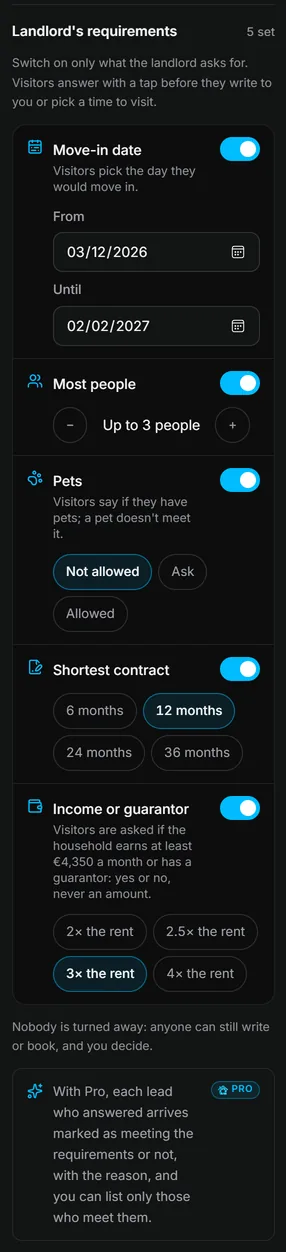
Result tenants see the questions in your contact form and before they choose a time for a viewing, and answer with a tap.
The requirements
| Requirement | What you set |
|---|---|
| Move-in date | The first and last day the tenant can move in |
| Most people | The most people who can live there |
| Pets | Not allowed, Ask (the landlord decides) or Allowed |
| Shortest contract | The shortest contract the landlord accepts |
| Income or guarantor | How many times the rent the household earns, or a guarantor |
What you see in Leads
On Pro and Business, each lead who answered arrives marked:
- Meets the requirements;
- or Doesn't meet, with the reasons, such as the move-in date or pets;
- or Some answers missing.
Above the list, Only those who meet the requirements shows only the leads who meet them. Meeting the requirements also counts in the lead's interest: see See what a buyer looked at before you call.
Was this helpful?
Thanks for telling us.
Sorry it did not help. Write to us and we will answer: support@vistura.app