Invite a photographer to edit a tour
- Plan: Pro
- Computer or phone
- Updated
In Vistura, you invite a photographer or a colleague to edit one tour from the tour's menu: Give a colleague access. They edit the photos, rooms and points; publishing, leads and statistics stay with you. Inviting editors needs Pro or Business on your account, and the person you invite can use a free account.
Steps
- On your dashboard, select Tour options (the … on the tour's card).
- Select Give a colleague access. The Share for editing dialog opens.
- Under Invite by email, type the person's email.
- Select Invite.
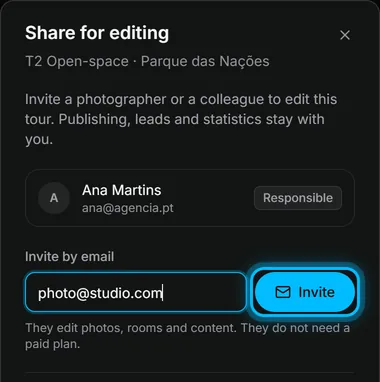
Result the person gets an email with a link. Once they accept, they show in the list with Can edit, and the tour shows on their dashboard under Shared with you.
What an editor can and can't do
| Can | Can't |
|---|---|
| Add, replace and rename photos | Choose who can see the tour, or change its address |
| Organise rooms and floors | Mark it as sold, take it offline or delete it |
| Link the rooms and add points | See its leads or its statistics |
| Edit the texts and what shows on screen | Invite others or hand the tour over |
An editor needs a Vistura account with the email you invited. They take no seat in your team, and they can leave the tour from their dashboard.
Was this helpful?
Thanks for telling us.
Sorry it did not help. Write to us and we will answer: support@vistura.app