EyeSpy360 Alternatives and Pricing for Real Estate Agents
EyeSpy360 pricing per room, checked 22 November 2026, and the EyeSpy360 alternatives for agents: Vistura, Matterport, Panoee, Giraffe360 and Kuula.
Start free14 days of Pro, no card.
EyeSpy360 is a pay-as-you-go virtual tour service: you upload 360 photos, its team builds the tour, and you pay per room, from $1 a room with a $15 minimum per tour. Of the EyeSpy360 alternatives for real estate agents, Vistura works the other way round: you build the tour yourself in the browser, from any 360 camera or your phone, publish it the same day, and pay a plan instead of a fee per room. Then every enquiry lands in one inbox and, on Pro, buyers book a viewing from inside the tour.
Vistura is made for selling and letting homes. Every new tour starts with your agent card, with WhatsApp, call and email, and a contact form, so the buyer writes to you without leaving the tour. Around it, Vistura makes the listing's material: a QR code for the window card, images for social media and a vertical reel from the tour's own rooms.
EyeSpy360's prices below come from its Smart Pricing page, checked 22 November 2026, which showed them in US dollars. Every other company's figure links to its own page. Check the linked page before you buy, in your own currency. Vistura's prices are in US dollars.
EyeSpy360 and Vistura, side by side
The fair test is what a listing gets from the shoot to the buyer's first message.
| EyeSpy360 | Vistura | |
|---|---|---|
| To start | First tour free, then pay as you go: "NO contracts. NO subscriptions." | 14 days of Pro first, no card. Then Free: 3 tours online at a time (sold, offline and private tours do not count), every lead in full in your inbox and by email, Vistura brand |
| Price per listing | From $1 per room, $15 minimum per tour, paid for each new tour | Pro: $24 a month or $19 billed yearly (founder price until 31 December), with unlimited tours online. No fee per room |
| Who builds the tour | You upload the photos; EyeSpy360's team builds the tour in less than 24 hours, Monday to Friday | You build it in your browser and publish it when you are ready, the same day |
| Capture | Any 360 camera, a phone on a rotator kit, or a DSLR stitched by hand | Any 360 camera, or your phone with Vistura Capture in its browser, on every plan. No rotator kit |
| Enquiries | Contact details emailed to the account owner | An inbox for every lead and an email, on every plan. On Pro: stages, notes, a follow-up date, alerts and "Before getting in touch" |
| Booking a viewing from the tour | Not described on the pages read | On Pro, buyers pick a free time in the tour and the viewing arrives as a lead |
| The seller | Not described on the pages read | Owner report by email or PDF on every plan; on Pro, the seller follows the tour read only |
Read across the rows: on EyeSpy360 each new listing is a new order, while on Vistura the plan covers every listing and the paid plans add the follow-up on each buyer who writes in.
EyeSpy360 pricing, per room
EyeSpy360 sells tours one at a time. Its Smart Pricing page, checked 22 November 2026, says "Pay As You Go. NO contracts. NO subscriptions. Your first tour is FREE."
| What you buy | Price shown | What the page says |
|---|---|---|
| A virtual tour | From $1 per room | "The minimum price per tour is $15, covering up to 15 spaces." Each tour includes a 3D model and a floor plan with measurements |
| Your first tour | Free | No conditions shown on the pricing page |
| 3D Virtual Tours, 3D Models & Floor Plan | From $15 | Listed under additional services |
| Virtual Staging | From $19 | Add-on |
| Still Photos to Video AI | From $19 | Add-on |
| Multilingual AI Avatar | From $119 | Add-on |
| Photography | From $173 | Add-on |
| CGI | From $670 | Add-on |
| Fly Through Drones | From $3,355 | Add-on |
| Interactive Digital Twins | POA | Price on application |
Two points to check before you order. First, what counts as a room: the page says larger or open-plan spaces may need more than one image, so count the 360 photos the home needs, not the rooms on the particulars. Second, how long the tour stays online: the features page lists "Unlimited Tour Cloud Hosting", and the pricing page read does not say how long a pay-as-you-go tour stays live. Ask EyeSpy360 before you print a QR code on a board that stays up for months.
What EyeSpy360 does well
EyeSpy360's strongest feature is the live viewing. EyeSpyLIVE puts a video call inside the tour, in the browser: you send a buyer a link by text or email and walk them round the home while you talk, and a visitor can call you from the tour while you are online. EyeSpyPLAY records your walk through the tour with your voice, and a visitor who calls while you are away can watch that recording. For an agent who sells to buyers abroad, or who would rather not shoot and stitch, a team that builds the tour from uploaded photos and a menu of add-ons from staging to drones is a real convenience.
Where agents look further
Each point below comes from EyeSpy360's own pages, read on 22 November 2026.
- A fee for every listing. Every new tour is a new order, from $15. With ten new listings a month, that is ten orders, before any add-on.
- A wait for the tour. The help centre says the team builds the tour in less than 24 hours, Monday to Friday. Photos uploaded on a Friday evening may wait until Monday.
- Leads end in an email. EyeSpyLEADS sends the visitor's details "directly in an email to the account owner's email address". The pages read do not describe a lead inbox, stages, notes or a reminder for each buyer.
- No viewing booking described. Live calls happen when you are online. The pages read do not describe a calendar where a buyer books a viewing at the home.
- No seller report described. The features page names no statistics per listing, and the pages read do not describe a report to send the seller.
- A phone needs extra kit. The camera page says a phone takes 360 photos with a rotator kit, and a DSLR needs a fisheye lens, a panoramic head and stitching by hand.
For an agent who wants one tour now and then, none of this matters much. For an agent with a stream of listings, it is the work that starts once the tour is live.
Vistura: the EyeSpy360 alternative with no fee per room
Vistura builds the tour in your browser, then keeps working on the listing: it collects every enquiry, books viewings on Pro and shows you and the seller what each tour is doing.
Build the tour yourself, the same day
Upload the 360 photos, link the rooms and floors, and publish. There is no order to place and no team to wait for, so the listing goes online the day you shoot it. Any 360 camera works. Without one, Vistura Capture guides you round each room with your phone and joins the photos into a 360, with no rotator kit and nothing to install. On Pro, Vistura hides the tripod with your logo, a plain disc or the floor around it.
Unlimited tours on Pro
On Pro you keep as many tours online as you have listings, with your logo and colours in place of the Vistura brand, for one monthly or yearly price. A home with 20 rooms costs the same as a studio.
Every enquiry in one inbox
Every lead arrives in full in your Vistura inbox and by email, on every plan, and you answer by WhatsApp, phone or email. On Pro, each lead moves through stages (New, Contacted, Visit booked, Offer, Won, Lost), with notes, a follow-up date and an alert on your phone or computer the moment it arrives. "Before getting in touch" shows the rooms each lead looked at, for how long and where they came from. Our guide to real estate lead follow-up shows what to do next.
Viewings booked from the tour (Pro)
Set your week once in the Visit calendar, then turn on Visit booking in each tour. Buyers tap "Book a visit" and pick only free times. The viewing lands in your leads at the Visit booked stage. See let buyers book a viewing. For a live walk-through on a video call, share the tour on the call you already use; our virtual open house guide shows how.
Numbers for you and for the seller
Visits and leads for each listing show on every plan. On Pro you also see where each visit came from, such as property portals, WhatsApp and messages, the QR code or social networks, and the rooms that hold attention. For each portal, copy a tagged link from "Link for portals" and its visits show apart.
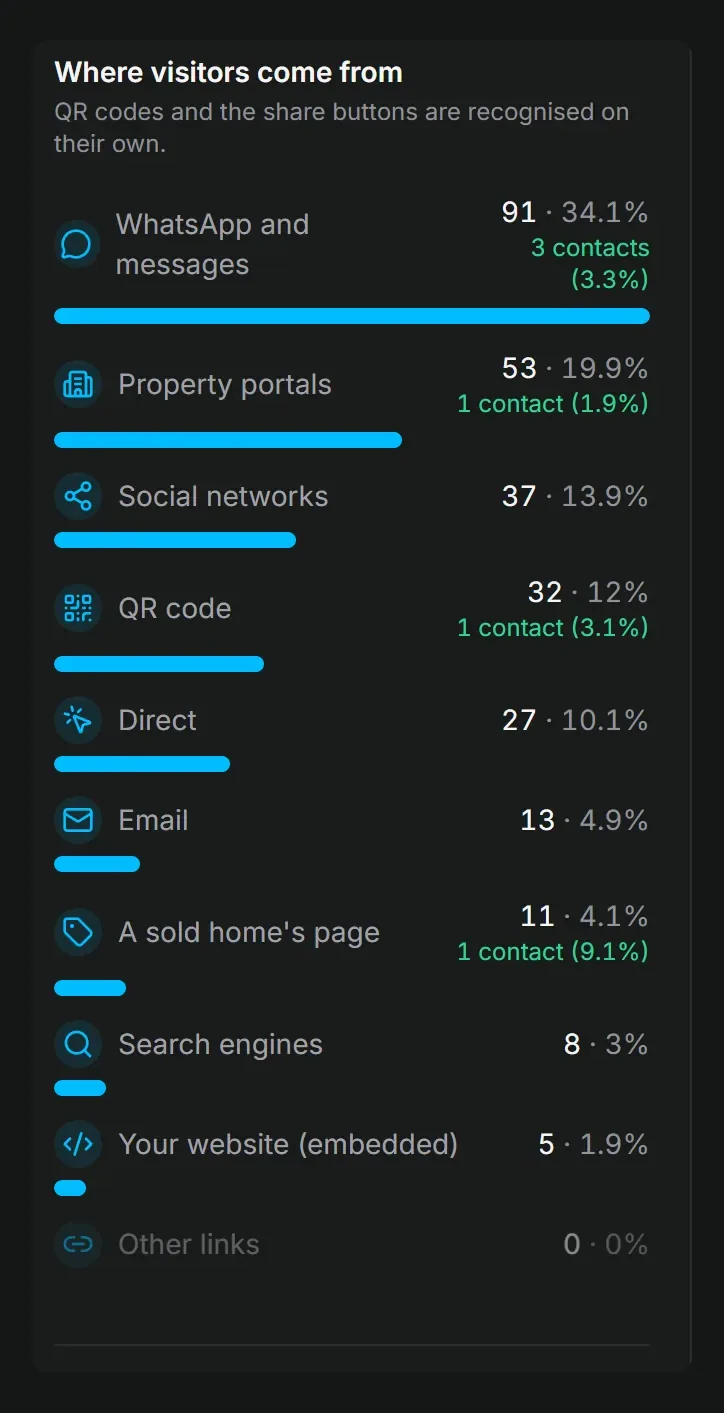
On every plan you send the owner report by email or as a PDF, with your note: the tour's visits and contact requests. On Pro it adds where visitors came from, the rooms they looked at most, the time in the tour and your logo, and owner access lets the seller follow the tour, read only. The seller report guide shows how to use it to keep the instruction.
Material for every channel
Every plan shares the tour by link, QR code, WhatsApp, embed code and your public profile. "Images for social media" turns a room into a post, story, square or link post with a QR code to the tour, and the vertical reel pans through the rooms. On Pro both carry your logo and colours, and you choose the reel's rooms and their order.
For agencies
Business includes 3 people, with shared tours, shared leads, the agency's brand and your own domain, such as tours.youragency.com. Each extra person costs $15 a month, or $12 billed yearly.
What it costs
Every new account starts with 14 days of Pro, with no card, and nothing is charged when they end. Then the account is on Free: 3 tours online at a time (sold, offline and private tours do not count), with no time limit, under the Vistura brand.
When the listing must bring enquiries and viewings, Pro is the plan: $29 a month, or $24 billed yearly. Business is $59 a month, or $49 billed yearly, for 3 people; each extra person costs $15 a month, or $12 billed yearly. Subscriptions started by 31 December 2026 get the founder price, kept while the subscription stays active: Pro at $24 a month or $19 billed yearly, Business at $49 or $39. The details are on Vistura's plans.
Bring your listings over from EyeSpy360
You took the 360 photos, so you already have what a Vistura tour needs.
- Put the original 360 photos of one listing in a .zip, numbered in walking order ("01 hallway", "02 kitchen").
- Create a tour in Vistura and drop the .zip on the photo list. Vistura keeps that order, drops the numbers from the names and makes each photo a room. It works on every plan; the help guide bring a tour from another app walks through each step.
- Link the rooms, add your agent card and, on Pro, "Book a visit".
- Swap the tour link on your portal listings and your website once the new tour is live and checked.
Start with the listing you are about to market, and move the rest as they come up.
Matterport, Panoee, Giraffe360, Kuula and CloudPano
Matterport scans the home in 3D. On its price list, checked 22 November 2026, Professional starts at $108 a month for 10 spaces. Our Matterport pricing guide covers every plan.
Panoee builds tours from 360 photos you upload, with a Free plan with 3 GB of storage and Pro at $22 a month, checked 22 November 2026; see our Panoee alternatives guide.
Giraffe360 pairs its own camera with a subscription. On the prices it publishes for Europe, checked 22 November 2026, the virtual tour comes with the camera plan, from €199 a month on a 12-month term; see Giraffe360 alternatives.
Kuula is a web host and editor for any 360 content, with Pro at $24 a month, or $20 a month billed yearly, checked 22 November 2026; see Kuula alternatives. CloudPano adds a phone app and live video calls; see CloudPano alternatives. For all eight tools in one ranked list, see our guide to the best virtual tour software.
All the alternatives side by side
| What it is | How you capture | Price | Where enquiries go | Viewings from the tour | |
|---|---|---|---|---|---|
| Vistura | Web app for listings | Any 360 camera, or your phone with Vistura Capture | 14 days of Pro, no card; then Free with 3 tours online at a time; Pro $24 a month or $19 billed yearly (founder price until 31 December) | Every lead in full in your inbox and by email, on every plan | On Pro |
| Matterport | 3D scans | Pro3, supported 360 cameras or its phone app | Professional 10 spaces, $108 a month | Business Card plugin | See our Matterport alternatives guide |
| Panoee | Web 360 tours for many industries | 360 photos you upload | Free, 3 GB; Pro $22 a month | Buttons for email, phone, WhatsApp or a link | Not on its pricing page |
| Giraffe360 | Camera plus subscription | Giraffe360 camera, in the subscription | Camera plan from €199 a month on 12 months | Enquiry forms in the tour | Not described on the pages read |
| Kuula | Web host and editor for any 360 content | 360 photos you upload | Pro $24 a month, $20 billed yearly | Contact card | See our Kuula alternatives guide |
| CloudPano | Web 360 tours and a phone app | 360 photos you upload, or its phone app | Prices in our CloudPano guide | Lead details to an email, on its higher plans | See the guide |
| EyeSpy360 | Pay-as-you-go tours built by its team | Any 360 camera, or a phone on a rotator kit | From $1 per room, $15 minimum per tour | An email to the account owner | Not described on the pages read |
To weigh the cost of the shoot itself, see how much a virtual tour costs, and for the basics, our real estate virtual tour guide.
Every listing online, with no fee per room
Picture every listing with a tour that goes live the day you shoot it, and every buyer who writes in waiting in one inbox, with the rooms they watched and a viewing already in your calendar.
You can check each piece before you pay: the agent card and contact form in every new tour, the lead stages and "Before getting in touch" on Pro, "Book a visit" in the tour on Pro, and the owner report with your note.
It takes little: a tour from your phone with Vistura Capture, nothing to install, or from the 360 camera you already own. No order to place, no wait for a team.
Compare the plans. Every new account gets 14 days of Pro with no card. Start free now.
Frequently asked questions
How much does EyeSpy360 cost?
On EyeSpy360's Smart Pricing page, checked 22 November 2026, tours are pay as you go, from $1 per room, with a minimum of $15 per tour covering up to 15 spaces, and the first tour is free. Add-on services are priced separately, such as photography from $173 and virtual staging from $19.
What does "per room" mean on EyeSpy360?
EyeSpy360's pricing page counts spaces: the $15 minimum per tour covers up to 15 of them, and it says larger or open-plan spaces may need more than one image. Count the 360 photos a home needs before you order.
Who builds an EyeSpy360 tour?
You take the 360 photos with a 360 camera, or a phone on a rotator kit, and upload them. EyeSpy360's help centre says its team then builds the 360 tour, the 3D model and the 2D floor plan in less than 24 hours, Monday to Friday.
Can I move my EyeSpy360 listings to Vistura?
Yes, from the original 360 photos you took. Put them in a .zip, numbered in walking order, and drop it on the photo list of a new Vistura tour, on every plan. Each photo becomes a room, in that order.
What is a good EyeSpy360 alternative for agents?
Vistura builds the tour in your browser from any 360 camera or your phone with Vistura Capture, with no fee per room. Every lead arrives in full in your inbox, and on Pro buyers book a viewing from the tour and you keep unlimited tours online.