CloudPano Alternatives and Pricing for Real Estate Agents
CloudPano pricing and alternatives, checked 15 November 2026: Pro Plus next to Vistura, Kuula, Panoee and 3DVista on leads, viewings and moving tours.
Start free14 days of Pro, no card.
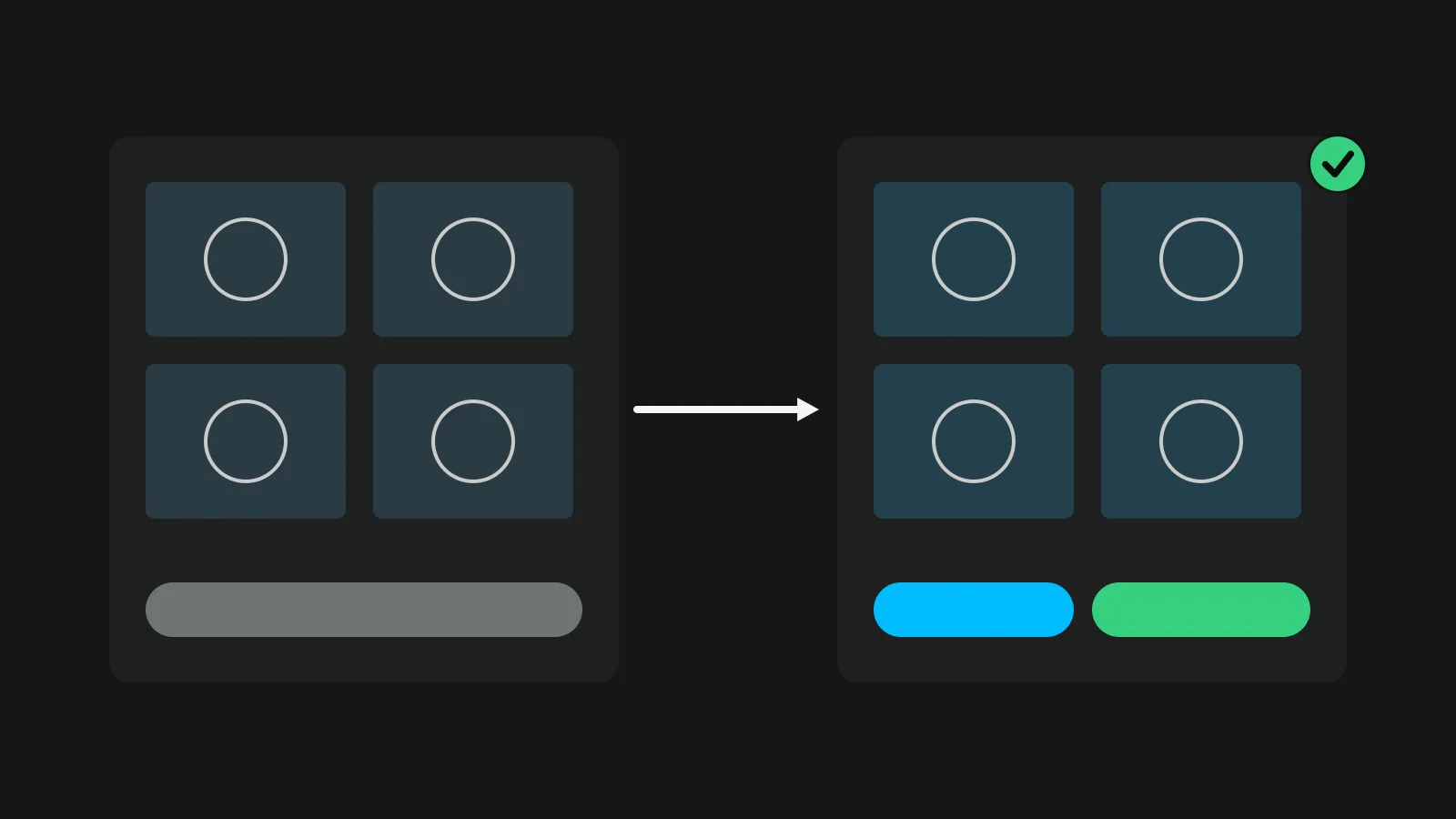
CloudPano is web software for 360 virtual tours, with MLS-compliant tours and Google Street View publishing, sold mainly as Pro Plus at $49 a month or $33 a month billed yearly. Of the CloudPano alternatives for real estate agents, Vistura is the one built around the listing: it builds the tour from your 360 photos as CloudPano does, then puts every enquiry in one inbox, shows the numbers for each listing and, on Pro, lets buyers book a viewing from the tour. Kuula, Panoee and 3DVista also build tours from 360 photos, and Matterport scans the home in 3D.
Vistura is made for real estate, and every part of it is there to sell or rent a home. Every new tour starts with an enquiry form and your agent card, with WhatsApp, call and email, so the buyer writes to you without leaving it. Around the tour, Vistura makes the rest of the listing's material: a QR code for the window card and the flyer, social images from the rooms, and listing photos stamped with the tour's QR code and link.
We make Vistura; every other price here comes from that company's own page, linked. Prices from each company's page on 15 November 2026 (Kuula on 8 November, Matterport in late October 2026), in US dollars before tax unless shown in euros. Check the linked page before you buy.
CloudPano and Vistura, plan by plan
CloudPano sells several plans, and its pages put some features on different ones. The fair test is what a listing gets at each step.
| CloudPano | Vistura | |
|---|---|---|
| To start | "Start for free, no credit card required"; a 14-day money-back guarantee on the Pro Plus checkout page | 14 days of Pro first, no card. Then $0: rooms, floors and links work for every visitor; agent card with WhatsApp and a form; every lead in full in your inbox and by email; 3 tours online at a time (sold, offline and private do not count), Vistura brand |
| First paid plan | Pro: $27 a month, or $22.50 a month billed yearly, to remove the CloudPano watermark and publish up to 3 projects; your logo, embed, hotspots | Pro: $24 a month or $19 billed yearly (founder price until 31 December). Unlimited tours online; lead stages, notes, follow-up date and alerts; "Before getting in touch"; viewing booking; where visits came from and the rooms they watched; owner access; your logo and colours |
| Higher plans | Pro Plus, $49 a month or $33 billed yearly: unlimited published projects, white label and your own URL, live video chat, floor plans, Street View, 1 user. Commercial, $199+ a month billed yearly, for teams of 5 | Business: $49 a month or $39 billed yearly (founder price until 31 December). 3 people; shared tours and leads; agency brand; your own domain; password-protected tours |
| Capture with a phone | CloudPano's iPhone app, and a $117 kit with a rotator and fisheye lens | Vistura Capture in the phone's browser, on every plan, with nothing to buy |
Read across the rows: CloudPano's higher plans add hosting, branding and live calls, while Vistura's add the follow-up on each buyer who writes in.
In Vistura, every part of the tour points at the sale or the let: on every plan the buyer gets the strip of rooms, every new tour starts with the enquiry form and your agent card, and on Pro the buyer books a viewing from the tour.
CloudPano pricing, item by item
CloudPano shows its prices on several pages, so this table gathers the figures from its own pages.
| Item | Price as listed | What it is |
|---|---|---|
| Free | Free to start, "no credit card required" | Start building for free |
| Pro | $27 a month, or $22.50 a month billed yearly | No CloudPano watermark, up to 3 published projects |
| Pro Plus | $49 a month, or $33 a month billed yearly | Unlimited tours, white label, live video chat; "All Pricing Shown in USD" |
| Commercial | $199+ a month billed yearly | Teams of 5 users |
| Enterprise | "Talk to an Expert" | 10 user accounts |
| Google Street View | $9.99 per upload | Publishing a tour to Street View |
| Mobile kit | $117 | Rotator, fisheye lens, mini tripod and charger |
Our arithmetic: Pro Plus billed yearly is 12 x $33 = $396 a year before tax, and Pro billed yearly is 12 x $22.50 = $270. CloudPano's pages do not all show the same figure for Pro, so check the current price on its home page before you buy. Its home page also offers the kit free with Pro Plus billed yearly.
What CloudPano does well
CloudPano covers a lot of ground. Its help centre has articles on "Tour Flash", which builds a virtual tour in one click, and on "Automatic Linkback". Its live video chat takes "up to 4 participants per call" with "no app download required". It publishes to Google Street View, makes "3D Dollhouse Floor Plans", produces MLS-compliant tours, and works with "most 360 cameras" as well as its own phone app. On Pro Plus you can download a tour to host yourself, and downloaded tours do not expire. Those are strengths for photographers who sell tours as a service. Agents look further when the job is the buyer.
Where agents outgrow CloudPano
Each point below comes from CloudPano's own pages.
- Leads go to an email, on a higher plan. On the lead generation page, the visitor's contact details are "forwarded to the specified email, generating a lead for your client." That page asks you to upgrade to Pro Plus, while the home page lists the "Lead generation tool" under Commercial. The page describes no stage, note or reminder for each lead.
- Tours online while you pay. "Your account will remain active as long as your subscription is active," says the help centre. On Pro Plus, tours never expire as long as you are subscribed.
- Automatic phone shots take a kit. The phone app works "for best results" with "an iPhone X or greater", and the rotator kit for automatic 360 photos costs $117.
None of this is a flaw for a photographer who delivers tours. For a listing, it is the work that starts after the tour goes live.
Vistura: the CloudPano alternative built for selling listings
Vistura builds the tour from your 360 photos, then keeps working once it is live: it collects every enquiry, books viewings on Pro and tells you and the seller what each listing is doing.
Buyers walk the home on every plan
Rooms, floors and the links between them work for every visitor, Free plan included. Each tour carries your agent card, with WhatsApp and a contact form, so a buyer who likes the kitchen can ask about it from inside the tour.
No 360 camera, no kit
Any 360 camera works. If you don't have one yet, start with your phone: Vistura Capture guides you through 24 to 35 shots per room and stitches them into a 360. It runs in the phone's browser, so there is nothing to buy or install. In the editor you can straighten a tilted photo, and on Pro Vistura erases the tripod using the floor around it, or covers it with a colour or your logo.
Every enquiry in one place
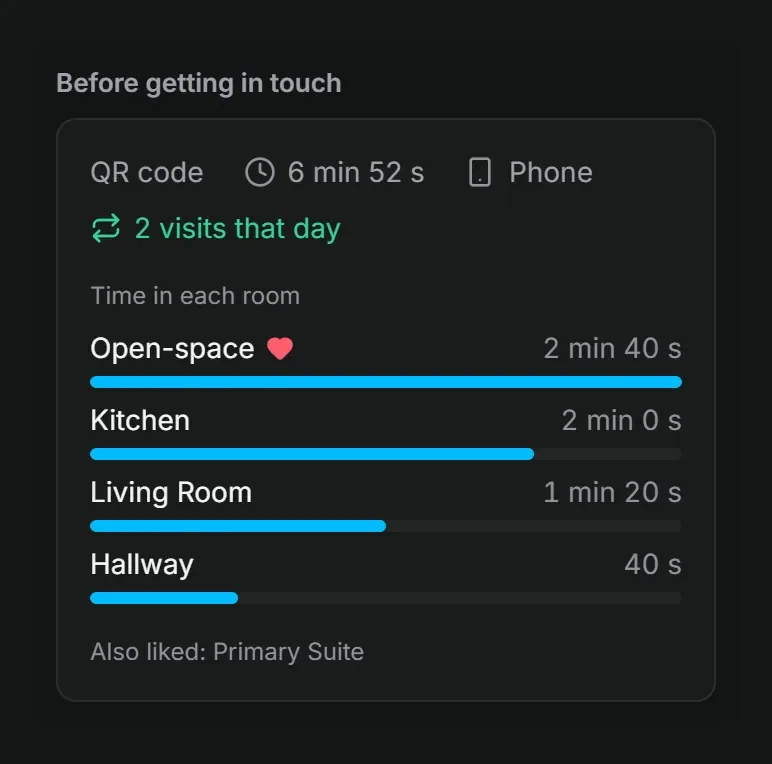
Every lead arrives in full in your Vistura inbox and by email, on every plan, and you reply by WhatsApp, phone or email. On Pro, each lead moves through stages (New, Contacted, Visit booked, Offer, Won, Lost), with notes, a follow-up date and an alert the moment it arrives. "Before getting in touch" shows the rooms each lead saw, for how long and where they came from. Our guide to real estate lead follow-up shows what to do with that.
Viewings booked from the tour (Pro)
You set your weekly schedule once: the length of a viewing, the gaps between them, the notice you need and any days off. Buyers pick only the free times, from inside the tour. The viewing arrives as a lead at the Visit booked stage, with an email and a calendar file.
Numbers for each listing, and for the seller
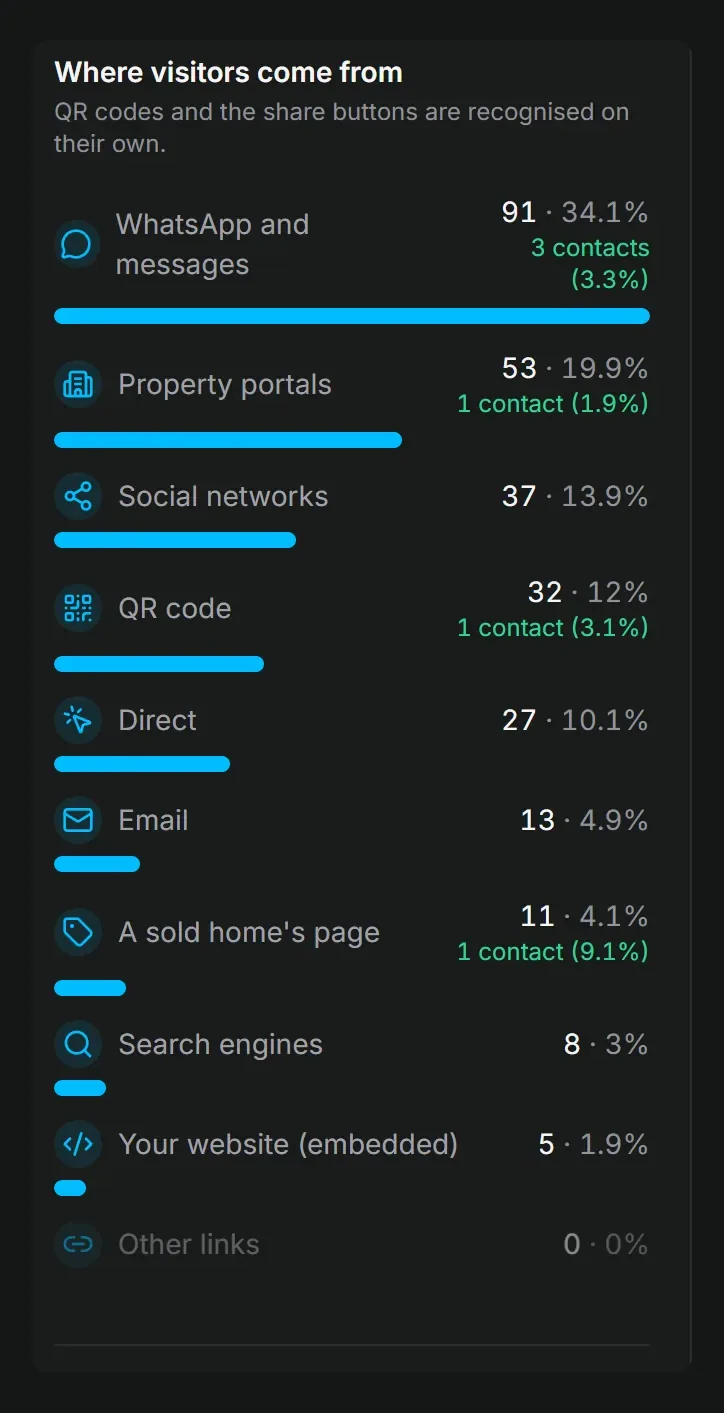
Visits and leads for each listing show on every plan. On Pro you also see where each visit came from (property portals, WhatsApp and messages, QR code, social networks or your website), the rooms that hold attention and the devices, kept from day one.
On Pro, owner access lets the seller follow the tour and its numbers, read only and with no buyer data. On every plan you can send the owner report by email or as a PDF, with your note: the tour's visits and contact requests. On Pro it adds where the visits came from, the rooms people looked at most and your logo.
A tour that speaks the buyer's language
The tour's buttons and messages follow each buyer's phone or browser language: English, Portuguese, Spanish, French, German, Italian or Dutch. One tour serves them all, with no copies to keep in step.
Share it everywhere
Every plan shares by link, QR code, WhatsApp, embed code and your public profile. Social images, stamped listing photos and a vertical reel are made from the tour's own rooms; on Pro they carry your logo and colours.
For agencies and 360 photographers
On Pro you invite editors, such as a photographer or a colleague. On every plan you can hand a finished tour to the agent's account, with its link, leads and statistics. Business includes 3 people, shared tours, leads and agency brand, password-protected tours and your own domain, such as tours.youragency.com.
What it costs
Every new account starts with 14 days of Pro, with no card, and nothing is charged when they end. Then the account is on Free: 3 tours online at a time (sold, offline and private tours do not count), with no time limit, under the Vistura brand.
When the listing must bring enquiries and viewings, Pro is the plan: $29 a month, or $24 billed yearly. Business is $59 a month, or $49 billed yearly, for 3 people; each extra person costs $15 a month, or $12 billed yearly. Subscriptions started by 31 December 2026 get the founder price, kept while the subscription stays active: Pro at $24 a month or $19 billed yearly, Business at $49 or $39. The details are on Vistura's plans.
Kuula, Panoee and 3DVista next to CloudPano
Each of the three takes a different route. Kuula is a web host for any 360 content, with Pro at $24 a month or $20 billed yearly; our Kuula alternatives guide covers it in full. Panoee has a free plan with 3 GB of storage and Pro at $22 a month. 3DVista moves the work to your computer: desktop software at $499 / 499 € once, with hosting from 99 € a year, compared in our 3DVista alternatives guide.
Matterport makes a 3D scan of the home rather than linking 360 photos. Our Matterport alternatives guide covers its plans and the tools around it.
All the alternatives side by side
Move your tours from CloudPano
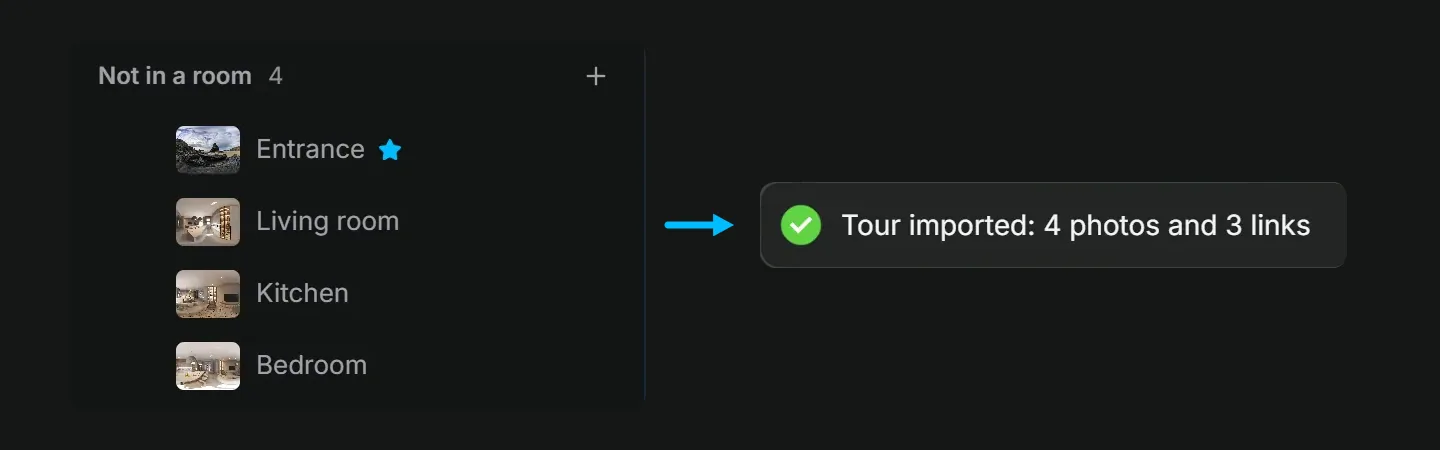
Your tour lives on CloudPano's servers, so you move the photos and rebuild the tour. A .zip of the original 360 photos, numbered in walking order, becomes the rooms of a tour in one upload; the next steps link them.
- Gather your original 360 photos from your camera app or stitching software. If you shot with CloudPano's phone app, check in your CloudPano account what you can download before you cancel; your camera's originals are the best copy.
- Name the files in walking order, such as "01 hallway" and "02 kitchen", and put them in a .zip.
- In Vistura, create a tour and drop the .zip on the photo list. Vistura keeps the order and drops the numbers from the names. Each photo can be JPEG, PNG or WebP, up to 25 MB.
- Select Add > Link photos automatically. Vistura compares the photos and proposes the links between the rooms; nothing changes until you confirm. Each link works in both directions, and you can drag any link onto its door.
- Add the finishing parts: your agent card, and on Pro the floor plan and the Book a visit button. Then share the new tour by link, QR code, WhatsApp, embed on your website and your public profile. Swap the old links once the new tour is live and checked.
On Pro Plus, CloudPano lets you download a tour as a .zip to host on your own server. Keep it as a backup; to bring the tour into Vistura, use the original photos as above. Tours made with krpano or Panotour, or exported from Panoee, come over with their links: see krpano alternatives.
Which CloudPano plan are you on?
Start from what you pay CloudPano today.
- Trying it free. Vistura gives every new account 14 days of Pro, no card, so you can test leads, viewing booking and the statistics on a real listing.
- Pro. On Vistura Pro the lead lands in your inbox with its stage, notes, follow-up date and the rooms the buyer saw, and the buyer books a viewing from the tour.
- Pro Plus. You pay for white label and unlimited tours. Vistura Pro has unlimited tours online, your logo and colours and the leads inbox; Business adds your own domain and 3 people.
- Commercial. You pay for a team of 5. Vistura Business includes 3 people, and each extra person costs $15 a month.
To weigh the cost of the shoot itself, see how much a virtual tour costs. For the basics of tours for listings, start with our real estate virtual tour guide.
Before your CloudPano plan renews, rebuild one live listing in Vistura with the steps above and compare the two links side by side. Then open both on your phone as a buyer would and try to ask about the kitchen: in the Vistura tour, the enquiry form and your agent card are right there, because Vistura is made for selling homes. Every new account starts with 14 days of Pro, no card, so you can test leads, viewing booking and the statistics on that listing: see Vistura's plans.
Frequently asked questions
Is CloudPano free?
CloudPano says you can start for free with no credit card, and it refunds Pro Plus within the first 14 days if you ask. Its pages describe the free account in different ways, so check what a free account can publish before you build a live listing on it.
How much is CloudPano Pro Plus?
On CloudPano's checkout page, Pro Plus costs $49 a month paid monthly, or $33 a month paid annually, in US dollars. Publishing to Google Street View costs $9.99 per upload on top.
Do I need the CloudPano kit to shoot with my phone?
CloudPano's iPhone app stitches a 360 photo from your shots and supports a clip-on fisheye lens. The $117 kit adds a rotator for automatic shots, a lens and a mini tripod. Vistura Capture works in the phone's browser and guides you through 24 to 35 shots per room, with nothing to buy.
What happens to my CloudPano tours if I cancel?
Your CloudPano account stays active while your subscription does, according to its help centre. Before the renewal date, save your original 360 photos in one folder per listing and, on Pro Plus, download each tour you want to keep as a backup. Then rebuild the tours you still need and update the links on your listings and your website.